Smart Mortise Lock Technical Guide: Engineering, Selection, and Deployment
A condition-based smart mortise lock technical guide covering compatibility, credentials, power, security, integration, installation, testing, and lifecycle planning.
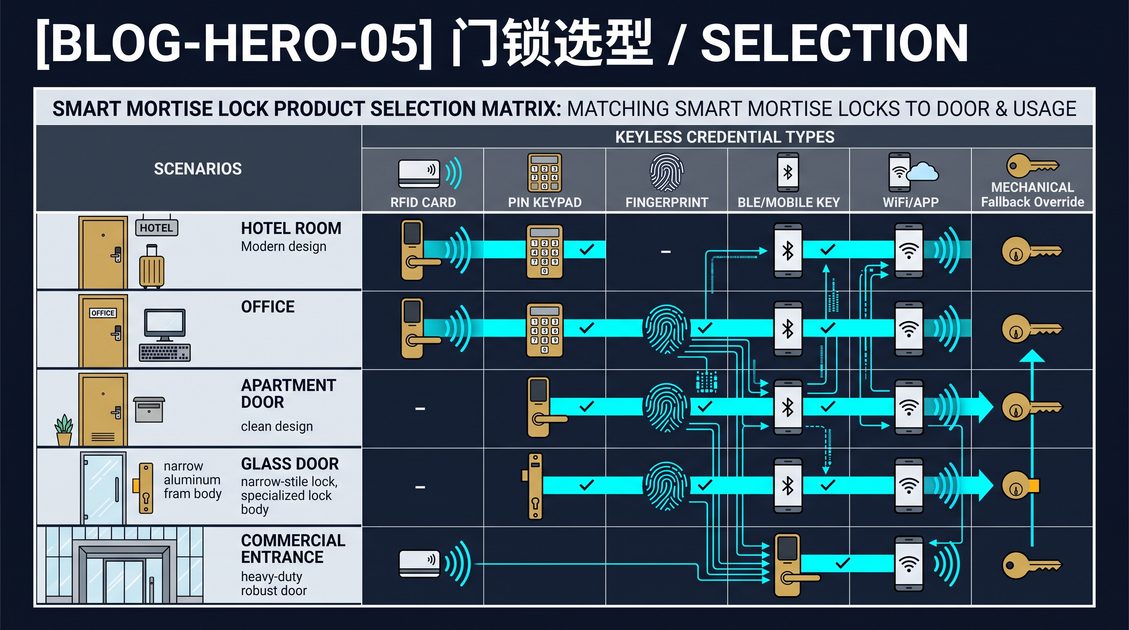
A smart mortise lock is an electronic lock whose motorized case, latch, bolt, reader, and controller are integrated into a rectangular body fitted into a pocket in the door edge. It is the dominant form factor for commercial, hospitality, European residential, and multifamily doors because the mortise case combines a latch and deadbolt in one assembly and supports a full handle set. This technical guide explains how a smart mortise lock works, the engineering dimensions that separate reliable hardware from a gadget, and the sequence for selecting, installing, commissioning, and maintaining one. Because a smart mortise lock is typically deployed across many doors and operated for years, the guide treats compatibility, credentials, power, security, integration, and lifecycle service as a connected system rather than a list of features.
Smart Mortise Lock Technical Guide: The Case and the Door
A smart mortise lock must match the physical opening before any electronic decision matters. The case height, width, and depth must fit the pocket cut into the door edge; the backset, the distance from the door edge to the center of the handle or cylinder, must align; and the faceplate must sit flush against the edge. The strike in the frame must line up with the latch and deadbolt when the door closes, and the handedness of the door must be configurable either mechanically or in software. A lock that is too large for the pocket, too small for the backset, or misaligned with the strike will not operate reliably no matter how capable the electronics are.
A new-build project specifies the lock and the door together, giving the widest freedom to choose the mortise body, finish, handle set, and strike. A retrofit is more constrained: the existing pocket determines what fits, so a drop-in electronic mortise lock that reuses the cutout is the cleanest upgrade, while changing form factor requires cutting a new pocket and specialist work on a rated or metal door. Before selecting any smart mortise lock, survey the door thickness, pocket, backset, strike, frame, closer, and fire rating, and confirm the exact model drawing against the measured opening.
A smart mortise lock is an electronic lock whose motorized case, latch, bolt, reader, and controller are integrated into a rectangular body fitted into a pocket in the door edge, the dominant form factor for commercial, hospitality, European residential, and multifamily doors. Before any electronic decision, the lock must match the opening: the case must fit the pocket, the backset must align, the faceplate must sit flush, and the strike must line up with the latch and deadbolt. New build specifies the lock and door together for the widest choice, while retrofit reuses an existing pocket for the cleanest drop-in upgrade. Survey door thickness, pocket, backset, strike, frame, closer, and fire rating first, and confirm the exact model drawing against the measured opening.
Smart Mortise Lock Technical Guide: Credentials and Readers
The credential is the interface a user sees and touches, and the right mix depends on the users and the security policy. The most common options are the PIN keypad, the RFID card or fob at 13.56 MHz, the fingerprint reader, and the mobile key over Bluetooth Low Energy or NFC. A keypad is the least expensive and requires nothing to carry, but a code can be shared or observed. An RFID card is fast, durable, and instantly revocable, making it the standard in hotels and offices. A fingerprint is the most personal and convenient for frequent users but costs more and needs a fallback for dry or worn fingers. A mobile key enables contactless entry and central credential delivery but depends on a charged phone.
Most serious smart mortise locks combine two or more credentials so that no single failure strands a user. The right combination matches the deployment: a hotel lock typically offers card plus mobile, an office offers card, mobile, and sometimes fingerprint, and a residential lock offers keypad, mobile, and sometimes fingerprint. The security of each credential depends on implementation. A keypad is as strong as its code policy, an RFID card as strong as its encryption and per-card diversified keys, a fingerprint as strong as its liveness detection and false-acceptance rate, and a mobile key as strong as its transport and platform authentication.
The credential is the interface a user sees and touches. The common options are the PIN keypad, the RFID card or fob at 13.56 MHz, the fingerprint reader, and the mobile key over Bluetooth Low Energy or NFC. A keypad is least expensive and requires nothing to carry, but a code can be shared; an RFID card is fast, durable, and instantly revocable and dominates hotels and offices; a fingerprint is most personal and convenient but costs more and needs a fallback for dry or worn fingers; a mobile key enables contactless entry but depends on a charged phone. Most serious locks combine two or more credentials so no single failure strands a user, matching the deployment: hotel card plus mobile, office card plus mobile plus fingerprint, residential keypad plus mobile plus fingerprint. Security depends on implementation, per-code policy, encrypted per-card keys, liveness detection, and secure mobile transport.
Smart Mortise Lock Technical Guide: Power and Emergency Access
Power is a reliability dimension, not a convenience one. A smart mortise lock runs on batteries, commonly AA cells, or is wired to a controller or access panel. Battery life depends on unlock frequency, reader type, radio use, and temperature, and can range from several months to about two years; a WiFi-connected lock drains faster than a Bluetooth-only model, and cold weather accelerates discharge. A reliable lock reports battery level and warns weeks before failure, and for a multi-door deployment a networked system reports battery status centrally so maintenance schedules replacement instead of reacting to a lockout.
Emergency access is what separates professional hardware from toys. When the battery dies, the network fails, or a phone is lost, the user must still get in. The common solutions are a mechanical key override, a backup power terminal such as USB or 9V on the outside of the lock, and a secondary credential such as a keypad or card. A smart mortise lock should preserve at least one of these and ideally more than one, so a dead battery never strands a user. For commercial and rental deployments, budget for battery replacement as a recurring operating cost and specify a clear emergency-access path in the deployment plan.
Power is a reliability dimension. A smart mortise lock runs on batteries, commonly AA, or is wired to a controller or access panel; battery life depends on unlock frequency, reader type, radio use, and temperature and can range from several months to about two years, with WiFi draining faster than Bluetooth and cold weather accelerating discharge. A reliable lock reports battery level and warns weeks before failure, and a networked system reports battery status centrally for multi-door maintenance. Emergency access separates professional hardware from toys: a mechanical key override, a backup power terminal such as USB or 9V, and a secondary credential such as a keypad or card ensure a user can enter when a battery dies, the network fails, or a phone is lost. Budget battery replacement as recurring operating cost and specify a clear emergency path.
Smart Mortise Lock Technical Guide: Security and Certification
The security of a smart mortise lock is measured by hardware, encryption, and bypass resistance, verified by certification. Hardware should use a secure microcontroller and, ideally, a secure element storing credentials and keys in tamper-resistant storage rather than in general memory. Communication, whether over the card reader, Bluetooth, WiFi, or NFC, should be encrypted so an attacker cannot replay or decode it. On the mechanical side, the bolt, strike, and mounting must resist forced entry, and the electronics must resist tampering and bypass.
Certification gives an independent check on these claims. CE indicates conformity with European safety and electromagnetic compatibility requirements, FCC covers radio emission limits in the United States, and RoHS restricts hazardous substances. For higher mechanical and security claims, UL or ANSI/BHMA grades, or equivalent national standards, verify strength and cycle life. A buyer should request the certificates, verify the number matches the exact model, and ask how credentials are stored and encrypted, because a compliant lock with weak encryption can still be bypassable. Encryption deserves special attention: prefer per-credential diversified keys over raw card numbers and server-side mobile authentication over static passcodes.
Security combines hardware, encryption, and bypass resistance, verified by certification. Hardware should use a secure microcontroller and ideally a secure element storing credentials in tamper-resistant storage. Communication over the card reader, Bluetooth, WiFi, or NFC should be encrypted to prevent replay or decoding, and the bolt, strike, and mounting must resist forced entry while the electronics resist tampering. Certification gives independent verification: CE for European safety and EMC, FCC for US radio limits, RoHS for restricted substances, and UL or ANSI/BHMA grades for strength and cycle life. Request certificates, verify the number matches the exact model, and ask how credentials are stored and encrypted. Prefer per-credential diversified keys over raw card numbers and server-side mobile authentication over static passcodes, because a compliant lock with weak encryption can still be bypassed.
Smart Mortise Lock Technical Guide: Integration and Management
A smart mortise lock is usually part of a managed system rather than a standalone device. The management layer enrolls locks, defines users and groups, sets validity and schedules, issues and revokes credentials, and records an audit trail. Integration connects the lock to the property-management system, a hotel PMS, an access-control platform, or energy management so check-in and check-out are automated and room status stays in sync. The depth of integration varies: the minimum is a shared interface passing essential events, while deeper integration passes housekeeping status and enables remote audit.
The architecture choice is standalone versus networked. A standalone lock keeps its user table on-device, works offline, and needs no hub or subscription, but each lock is managed individually and audit data stays local. A networked lock syncs to a gateway or cloud platform for central enrollment, credentialing, scheduling, and audit across many doors. For a single home, standalone is usually enough; for an office, a hotel, or a multifamily building, networked management is the reason to choose the system. Audit trails are only useful at scale when centralized, timestamped, and attributed to a user, so require platform-level logging and test the actual management software rather than trusting a spec sheet.
A smart mortise lock is usually part of a managed system. The management layer enrolls locks, defines users and groups, sets validity and schedules, issues and revokes credentials, and records an audit trail, while integration connects the lock to a property-management system, hotel PMS, access-control platform, or energy management to automate check-in and check-out and sync room status. The architecture choice is standalone versus networked: standalone keeps its user table on-device, works offline, and needs no hub but is managed individually, while networked syncs to a gateway or cloud for central enrollment, credentialing, scheduling, and audit across many doors. A single home needs standalone; an office, hotel, or multifamily building needs networked. Audit trails are only useful at scale when centralized, timestamped, and attributed to a user, so require platform-level logging and test the real software.
Smart Mortise Lock Technical Guide: Installation and Commissioning
Installation is where a smart mortise lock project succeeds or fails. Fit the lock body into the pocket, mount the faceplate flush, align the strike, and fit the handle, reader, and cylinder before applying power. Operate the lock mechanically with the door open: the latch and bolt should move smoothly, the handle should retract the latch, and the door should close without excessive force. If the mechanism binds, correct the pocket or door alignment rather than relying on motor force or timing changes.
Commission the complete opening, not just the lock. Test valid, invalid, expired, and revoked credentials, inside release, auto-lock if enabled, manual override, power loss, network loss, and door-position sensing. For a hotel or multifamily rollout, test representative doors from each hardware batch rather than approving one sample. Record the lock identifier, firmware, administrator, configuration, and maintenance owner, and train the people who issue credentials and respond to lockouts. Schedule an early follow-up inspection because screws settle and alignment can change after repeated cycles.
Installation is where a project succeeds or fails. Fit the lock body into the pocket, mount the faceplate flush, align the strike, and fit the handle, reader, and cylinder before applying power; operate the lock mechanically with the door open so the latch and bolt move smoothly and the door closes without excessive force. If the mechanism binds, correct the pocket or alignment rather than relying on motor force. Commission the complete opening, testing valid, invalid, expired, and revoked credentials, inside release, auto-lock, manual override, power loss, network loss, and door-position sensing. For a hotel or multifamily rollout, test representative doors from each hardware batch. Record the lock identifier, firmware, administrator, and configuration, train credential issuers and lockout responders, and schedule an early follow-up inspection.
Smart Mortise Lock Technical Guide: Specifying for Projects
For a multi-door project, the smart mortise lock specification should be written as a system, not a single product. State the door and frame type, the case dimensions, the credential mix, the power arrangement, the integration interface, the management platform, the security and certification requirements, and the service and spare-part plan. Request the exact dimensional drawing, wiring or battery information, installation template, environmental limits, and maintenance instructions for the selected variant, and do not assume a product-family specification applies to every model.
Cost in a smart mortise lock project has several layers: the hardware per door, which scales with the case and readers; the installation, which depends on new build or retrofit; the credentials, which recur as cards are consumed or mobile keys licensed; and the software, often a recurring per-door or per-property fee. This guide recommends calculating a five-year total cost of ownership per door rather than comparing only the unit price. For importers and OEM buyers, confirm the MOQ for the standard and customized lock, commit the lead time in writing, clarify payment terms, and understand the spare-parts supply, because a lock is deployed once and operated for years.
For a multi-door project, specify a smart mortise lock as a system, stating the door and frame type, case dimensions, credential mix, power arrangement, integration interface, management platform, security and certification requirements, and service and spare-part plan. Request the exact drawing, wiring or battery information, installation template, environmental limits, and maintenance instructions, and do not assume a product-family specification applies to every model. Cost has several layers: hardware per door, installation depending on new build or retrofit, recurring credential costs, and recurring software fees. Calculate a five-year total cost of ownership per door. For importers and OEM buyers, confirm the MOQ for standard and customized locks, commit lead time in writing, clarify payment terms, and understand spare-parts supply, because a lock is deployed once and operated for years.
Smart Mortise Lock Technical Guide: Credential Lifecycle and Administration
Credential administration is the operational heart of a smart mortise lock system, and it should be designed before hardware is ordered. Define who can enroll locks and users, how credentials are issued and revoked, how temporary access expires, and how a lost card, phone, or key is handled. For a hotel, a guest credential is valid only for the stay; for an office, an employee credential is valid only for employment; for a rental, a guest code is valid only for the booking. A well-run system issues credentials with the correct scope and revokes them the moment they should no longer work.
The front-desk or administrator workflow determines how smoothly this runs. A front-desk encoder should issue a guest card or mobile key in seconds at check-in, a lost card should be reissued by revoking the old credential and encoding a new one, and check-out should revoke access automatically through the management platform. Installer and administrator accounts should be kept separate from daily user credentials, and the system should record who issued or revoked which credential at which time. This credential lifecycle is what makes a smart mortise lock scalable beyond a single door.
Credential administration is the operational heart of a smart mortise lock system. Define who can enroll locks and users, how credentials are issued and revoked, how temporary access expires, and how a lost card, phone, or key is handled. For a hotel, a guest credential is valid only for the stay; for an office, only for employment; for a rental, only for the booking. The administrator workflow determines smoothness: a front-desk encoder issues a guest card or mobile key in seconds, a lost card is reissued by revoking and re-encoding, and check-out revokes access automatically. Keep installer and administrator accounts separate from daily user credentials and record who issued or revoked each credential at which time.
Smart Mortise Lock Technical Guide: Environmental and Specialty Doors
A smart mortise lock must also suit the environment and the door type. Outdoor and high-moisture locations require an ingress-protection rating, commonly IP54 or higher, to survive rain, dust, and temperature swings, which also shorten battery life. Extreme cold affects both batteries and the lubricants and moving parts of the mechanism. A lock on a metal door can interfere with wireless signals and needs careful antenna placement, and a fire door requires hardware that preserves the fire rating and a fail-safe or fail-secure configuration that meets the life-safety requirement.
Specialty doors need specialized hardware. Sliding glass and patio doors require a lock designed for the narrow stile of the sliding panel; french doors need a mechanism that handles both leaves, usually mortise or multi-point; and interior thumb-turn doors need a lock that preserves the privacy function while adding electronic control. Commercial security doors and high-security applications may require an electrified mortise lock wired to a central access-control panel. Match the lock to the physical reality before matching it to a feature list, and ask suppliers for door-specific recommendations rather than choosing from a generic catalog.
A smart mortise lock must suit the environment and door type. Outdoor and high-moisture locations require an ingress-protection rating, commonly IP54 or higher, to survive rain, dust, and temperature swings, which also shorten battery life; extreme cold affects batteries and the lubricants and moving parts. A metal door can interfere with wireless signals and needs careful antenna placement, and a fire door requires hardware that preserves the fire rating and a compliant fail-safe or fail-secure configuration. Specialty doors need specialized hardware: sliding glass and patio doors need a lock for the narrow stile, french doors need a mechanism for both leaves, interior thumb-turn doors need privacy plus electronic control, and high-security doors may need an electrified mortise lock wired to a central panel.
Smart Mortise Lock Technical Guide: Total Cost of Ownership
The total cost of ownership of a smart mortise lock deployment is what a buyer should optimize, not the unit price. Hardware cost per door scales with the case, the credential readers, and the finish. Installation cost depends on whether the project is new build or retrofit, and retrofit on a solid-core or fire-rated door can be significant. Credential costs recur as cards are consumed or mobile-key licenses are issued. Software cost, the management platform and its support, is often recurring per door per property. Add the cost of battery replacement, which is an operating expense over the service life.
For a single home, a standalone smart mortise lock has no recurring software fee, so its total cost of ownership is low. For a multi-door commercial or hotel deployment, the software subscription and the credential and battery costs dominate, and a cheap lock with weak management can be far more expensive over five years than a pricier networked lock. This guide recommends calculating a five-year cost per door that includes hardware, installation, credentials, batteries, and software, and asking the supplier for the software pricing model in writing, because recurring fees are where surprise costs hide.
The total cost of ownership of a smart mortise lock deployment is what a buyer should optimize, not the unit price. Hardware per door scales with the case, readers, and finish; installation depends on new build or retrofit; credential costs recur as cards are consumed or mobile keys licensed; and software, the management platform and support, is often recurring per door or property. Add battery replacement as an operating expense. For a single home, a standalone lock has no recurring software fee and a low total cost. For a multi-door deployment, the software subscription and credential and battery costs dominate, and a cheap lock with weak management can be more expensive over five years than a pricier networked one. Calculate a five-year cost per door and get the software pricing model in writing.
Smart Mortise Lock Technical Guide: Maintenance and Lifecycle
Maintenance keeps a smart mortise lock reliable over its service life. Check alignment, fasteners, handles, strikes, seals, battery status, firmware, and administrator permissions during regular visits. Clean the reader and trim with materials approved by the manufacturer and investigate rough operation promptly, because a binding door can shorten battery life and strain the actuator. Keep spare parts, batteries, firmware, and documentation available for the planned service life, and confirm the after-sales support model, including warranty and training.
Lifecycle planning also covers upgrade and end-of-service. Decide how credentials are migrated when a firmware or platform update occurs, how audit data is exported for compliance, and how a property is re-secured when hardware is replaced or a tenant or staff member departs. For a commercial or hotel deployment, select a supplier accountable for the full lifecycle, because reliability shows up over years of operation rather than on the first order.
Maintenance keeps a smart mortise lock reliable over its service life. Check alignment, fasteners, handles, strikes, seals, battery status, firmware, and administrator permissions during regular visits, clean the reader with manufacturer-approved materials, and investigate rough operation promptly because a binding door can shorten battery life and strain the actuator. Keep spare parts, batteries, firmware, and documentation available for the planned service life, and confirm the after-sales support model, warranty, and training. Lifecycle planning also covers credential migration during platform updates, audit-data export for compliance, and re-securing a property when hardware is replaced or a person departs. Select a supplier accountable for the full lifecycle, because reliability shows up over years of operation rather than on the first order.
FAQ: Smart Mortise Lock Technical Guide
What is the difference between a smart mortise lock and a smart deadbolt?
A smart mortise lock uses a rectangular case fitted into a pocket in the door edge, combining a latch and deadbolt in one assembly and supporting a full handle set. It is standard for commercial, hospitality, and European residential doors. A smart deadbolt uses a cylindrical chassis through a round hole and is typical of North American doors.
Will a smart mortise lock fit my existing door?
It fits if the case dimensions, backset, faceplate, strike, handing, and door thickness match the opening. A door with an existing mortise pocket is best served by a drop-in electronic mortise lock that reuses the cutout. Measure the door and compare to the exact model drawing before ordering.
What credentials does a smart mortise lock accept?
The common options are a PIN keypad, an RFID card or fob, a fingerprint, and a mobile key over Bluetooth Low Energy or NFC. Most serious locks combine two or more so a user is never locked out by a lost card, dead phone, or dry finger.
How long do the batteries last and what happens when they die?
Battery life ranges from several months to about two years depending on unlock frequency, reader type, radio use, and temperature. A reliable lock reports battery level and provides emergency access via a mechanical key, a backup power terminal, or a secondary credential.
Are smart mortise locks secure?
Security depends on hardware, encryption, and bypass resistance, verified by certification such as CE, FCC, RoHS, and, for higher claims, UL or ANSI/BHMA grades. Prefer per-credential encryption and secure-element storage, and request the actual certificates for the exact model.
Do I need a management platform?
For a single home, a standalone lock with an app is usually enough. For an office, hotel, or multifamily building, a networked management platform provides central enrollment, credentialing, scheduling, audit, and instant revocation at scale.
Smart Mortise Lock Technical Guide: Supplier Selection and Risk
For a multi-door deployment, the supplier is part of the purchase. Verify the manufacturer's credentials, request reference installations at projects of comparable size, and confirm warranty, spare parts, technical documentation, and training. A supplier accountable for the hardware, the certification, and the support from a single source is worth more than the lowest first-unit price, and buying directly from a manufacturer of smart mortise locks gives a single accountable partner across the project.
Risk management should cover the failure modes that a smart mortise lock introduces. Plan for depleted batteries, a lost phone, a forgotten code, a firmware issue, and a network outage, and document the recovery path for each. Keep spare batteries, cards, and parts available, maintain a current recovery contact, and test the documented procedures rather than assuming they work. For a commercial or hotel property, the cost of a lockout or a security gap far exceeds the price difference between a reliable system and a marginal one, so selection should be weighted toward reliability and support.
For a multi-door deployment, the supplier is part of the purchase. Verify credentials, request reference installations at projects of comparable size, and confirm warranty, spare parts, technical documentation, and training. A supplier accountable for hardware, certification, and support from a single source is worth more than the lowest first-unit price, and buying directly from a manufacturer gives a single accountable partner. Risk management should cover the failure modes a smart mortise lock introduces: depleted batteries, a lost phone, a forgotten code, a firmware issue, and a network outage, each with a documented recovery path. Keep spares available, maintain a current recovery contact, and test the procedures. The cost of a lockout or security gap far exceeds the price difference between a reliable system and a marginal one.
Smart Mortise Lock Technical Guide: Project Handover
A project is not complete when the lock is physically mounted; it is complete when the operating team can manage and recover it. Handover should include the final door schedule, measured compatibility information, lock and controller identifiers, credential roles, administrator ownership, firmware records, wiring or battery details, and the approved emergency procedure. Store this information in a controlled location and give access only to the people responsible for security and maintenance. Include a simple contact path for urgent failures so the first response is not delayed by uncertainty.
The operating team should receive practical training, not only a product demonstration. Show how to issue, change, and revoke credentials, interpret low-battery or door-position alerts, respond to a communication outage, perform emergency recovery, and escalate a suspected security event. Test the handover by asking a different operator to follow the written procedure without assistance. Any ambiguity found during that exercise is a commissioning defect and should be corrected before the project is accepted.
A useful handover also defines review intervals. Recheck permissions after staff changes, inspect representative openings after the first operating period, review audit-log retention, and test backup access at a documented frequency. When a platform, firmware version, or door use changes, reassess the original assumptions. This disciplined closeout protects the investment and keeps a smart mortise lock system understandable to the people who must operate it years after installation. It should also identify the person who approves configuration changes, the person who maintains the opening, and the person who receives security notifications. Clear ownership prevents a valid alert from becoming nobody’s responsibility. Review the schedule annually and after any significant change to staff, layout, or the access-control platform so the operating model never drifts from the intended one.
Conclusion: Deploy a Smart Mortise Lock That Runs Your Property
This smart mortise lock technical guide has covered the case and door, credentials, power, security, integration, installation, specification, lifecycle, supplier selection, and project handover. A smart mortise lock is engineered hardware deployed across many doors and operated for years, so a disciplined process matters more than a single feature. The unifying recommendation is to match the lock to the physical opening, combine credentials with a reliable fallback, plan power and emergency access, verify security and certification, and select a management architecture that scales to the deployment.
Apply this guide as a specification. Survey the door and confirm the case drawing, choose the credential mix for the users, plan battery and emergency access, verify encryption and certification, integrate with the management and property systems, and calculate total cost of ownership across the service life. A well-chosen smart mortise lock is a durable access-control foundation for a hotel, office, or multifamily property. Review the system after commissioning and preserve its documentation throughout the complete operating lifecycle.
Part of this article content is generated by AI and optimized for professional accuracy and readability.
Not sure which sensor fits your project?
Talk to our mmWave application engineers for a free consultation.
Specify your hotel project with our engineers
Send your room count, ceiling type, and protocol preference. We will return a sample plan and quote within 24 business hours.
- Move from general guidance into a product or application discussion.
- Use RFQ when pricing, drawings, MOQ, or launch timing needs structure.
- Keep a direct contact path visible for fast clarifications and handoff.