Smart Door Locks Selection Guide: How to Choose the Right Electronic Lock
A complete buyer-oriented smart door locks selection guide: opening methods, connectivity, battery, security, standards, and retrofit considerations for home and commercial doors.
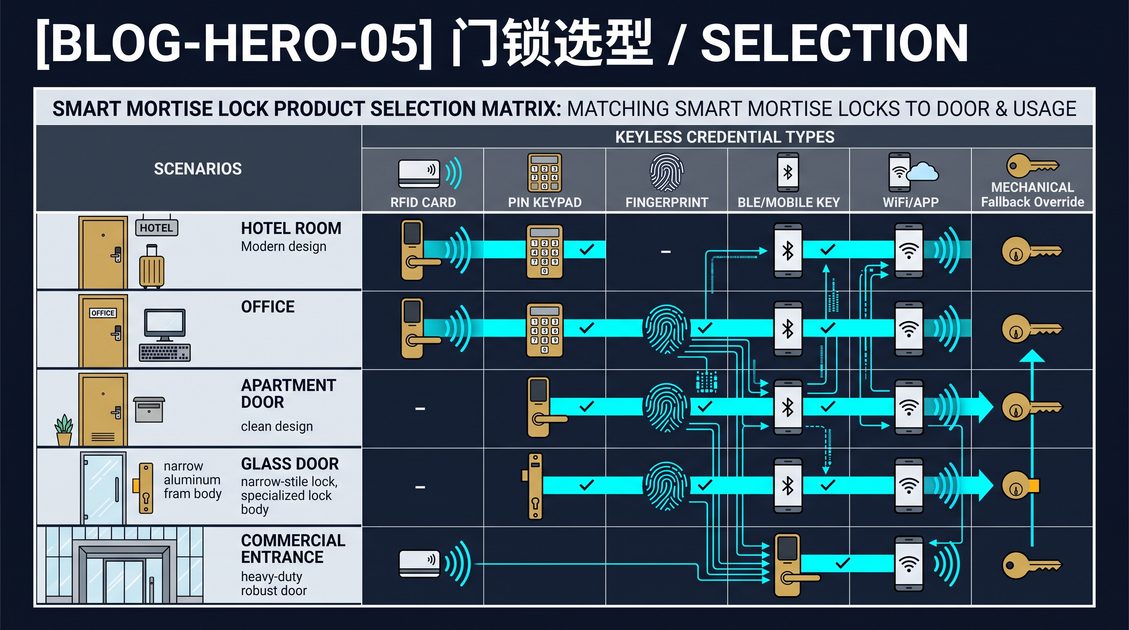
A smart door lock is an electronic access control device that replaces or upgrades a mechanical lock so that doors can be unlocked with a credential rather than a traditional key. Credentials range from PIN codes and RFID cards to fingerprints, mobile phone apps, and voice commands, and the locking mechanism is typically an electronically driven deadbolt or a mortise lock body. This smart door locks selection guide is written for homeowners, property managers, system integrators, and importers who need to compare models on concrete criteria rather than brand claims. The right smart door lock depends on your door structure, your users, your connectivity environment, and your security expectations, and choosing incorrectly is expensive because most electronic locks are installed once and stay in place for years. This guide breaks the decision into ten sections, each ending with a self-contained answer block that you can compare across locks. It is intended as a permanent reference you can return to whenever a door, a tenant, or a building layout changes.
What Is a Smart Door Lock and Why It Matters
A smart door lock is an electromechanical lock that is controlled by a micro-controller and authenticated by a credential presented to a reader, rather than by turning a physical key that engages tumblers. The credential can be a numeric code entered on a keypad, a contactless card or fob, a biometric sample such as a fingerprint or face, or a mobile device that communicates over Bluetooth Low Energy, WiFi, NFC, or a cellular gateway. When the credential is validated against an authorization table stored on the device or in a management platform, the controller drives a motor or solenoid that retracts the bolt or latch, unlocking the door for a defined period or until the door is closed again.
Why smart door locks matter is about removing the weakest link in physical security, the key. Keys are copied, lost, carried by former tenants, and impossible to revoke quickly. A smart door lock turns entry management into a digital operation: codes can be changed in seconds, access can be time-limited, and an audit trail can show exactly which credential entered at which minute. For a single-family home the benefit is convenience; for a multifamily building, an office, or a short-term rental the benefit is control. A smart door lock also removes the need to rekey or replace cylinders between tenants, because revoking a digital credential is instantaneous and free.
An entry that is remote, automated, and logged is also an entry that scales. When you manage one door the difference is small, but when you manage dozens of apartment units, hotel rooms, or office doors, the ability to issue and revoke access from a dashboard without touching each lock changes the economics of access control entirely. This is why the commercial adoption of electronic locking is growing faster than residential adoption, and why the smart door locks selection guide pays as much attention to management software as to the physical hardware.
How Smart Door Locks Work Compared to Traditional Locks
A traditional mortise or cylinder lock relies on mechanical key alignment inside a plug. When the correct key is inserted and turned, the plug rotates and moves the bolt; wrong keys simply do not align the pins, and nothing moves. A smart door lock replaces or augments this mechanical path with an electronic one. Inside the lock body there is a reader or keypad, a micro-controller running the authorization logic, a motor or solenoid actuator, and a power source, usually batteries. When a valid credential is presented, the controller energizes the actuator, which physically moves the bolt, and the same mechanical parts that hold the door closed do their work.
The critical architectural difference is where the intelligence lives. A mechanical lock is fully autonomous and needs no power, but it also cannot know who opened it or when. A smart door lock can be either standalone, meaning the authorization table is stored locally and all decisions happen on the device, or networked, meaning the lock communicates with a hub, gateway, or cloud platform that manages credentials, schedules, and audit logs. Standalone locks are cheaper and easier to deploy; networked locks are easier to administer at scale. Many modern locks support both: they operate locally for speed and reliability even when the network is down, and they sync to a platform when connectivity returns.
A useful way to think about the comparison is by what fails. A mechanical key lock fails only if the mechanism wears or the key breaks. A smart door lock adds new failure modes that a buyer must plan for: depleted batteries, a lost phone, a forgotten code, a firmware issue, or a network outage. The engineering challenge, and the reason reputable manufacturers spend heavily on design, is to make the electronic path as reliable as the mechanical one. Good smart door locks keep a mechanical key override, provide low-battery warnings well in advance, and behave predictably when disconnected. This guide will return to these reliability dimensions repeatedly, because they separate a lock you can trust from a gadget.
A smart door lock replaces the weakest link in physical security, the key, with a digital credential that can be issued, scheduled, and revoked in seconds. The lock body contains a reader or keypad, a micro-controller, and a motor or solenoid actuator powered by batteries; a mechanical key override is retained as a failsafe. Standalone locks keep the authorization table on-device, while networked locks sync to a hub or cloud platform for central administration and audit trails. Electronic locking matters most at scale: a home gains convenience, while a multifamily building, office, or rental gains the ability to manage dozens or hundreds of doors from one dashboard. Because the electronic path adds new failure modes, battery depletion, lost credentials, and network outages, a well-designed smart door lock must warn early, behave predictably offline, and preserve a reliable mechanical override.
Smart Door Locks Selection Guide: Key Criteria Overview
This smart door locks selection guide evaluates locks on a consistent set of criteria, because comparing electronic locks purely on price hides the differences that determine whether a lock actually fits. The first criterion is door structure: a mortise lock pocket, a cylindrical deadbolt, a rim latch, or a specialty door such as a sliding glass or french door each require a different lock body. The second is opening method, meaning which credentials the reader accepts, and whether the mix matches your users. The third is connectivity, the protocol a lock speaks and whether it integrates with the ecosystems you already use. The fourth is power, battery type, expected life, and emergency access when the battery dies. The fifth is security, hardware certification, encryption, and resistance to bypass. The sixth is management, whether a lock is standalone or networked and how many users the software supports. The seventh is environmental rating for outdoor or high-moisture locations. The final criterion is cost of ownership, including hardware, installation, credentials, and ongoing management.
Not every criterion matters equally for every buyer, which is exactly why this guide exists. A homeowner installing one front door cares most about opening method, reliability, and integration with their phone. A property manager deploying fifty units cares most about management software, credential flexibility, and total cost of ownership. An importer or OEM evaluating a supplier cares most about certification, MOQ, and the availability of a mortise lock body that fits their market. Because the smart mortise lock is the dominant form factor for commercial, hotel, and European door markets, the guide gives special attention to how these criteria play out on a mortise lock body rather than only on a US-style deadbolt.
A structured comparison across door structure, opening method, connectivity, power, security, management, environmental rating, and cost of ownership is the only reliable way to choose a smart door lock. Door structure decides the lock body, whether mortise, cylindrical, rim, or specialty; the mortise form factor dominates commercial and European markets. Opening method must match your users, whether codes, cards, fingerprints, mobile, or voice. Connectivity determines integration with existing ecosystems and whether management is standalone or networked. Power planning covers battery type, expected life, and the emergency path when power is lost. Security encompasses hardware certification, encryption, and bypass resistance. Environmental rating matters for outdoor and high-moisture locations. Finally, cost of ownership includes hardware, installation, credentials, and long-term management software. Each buyer weights these differently, which is why a single recommended model cannot serve every door.
Door Structure: Mortise, Cylindrical, and Specialty Fits
Before any electronic decision, the physical door wins. A smart door lock must mechanically fit the cutout, the backset, the thickness, and the handedness of your door. The three dominant families are the mortise lock, the cylindrical lock, and the rim or specialty lock. A mortise lock is a rectangular lock body fitted into a deep pocket cut into the edge of the door; it is the dominant standard in commercial, hospitality, and European residential construction, and it carries the mortise lock body, latch, and deadbolt in one assembly. A cylindrical lock uses a two-part chassis that screws together through a round hole, typical of North American interior and some exterior doors. A rim lock mounts on the surface of the door and is common on older or specialist doors.
Choosing the wrong family means your candidate smart lock simply will not install, no matter how good it is. The backset, the distance from the door edge to the center of the cylinder or handle, must match, and the door thickness must fall within the lock's specified range. Handedness, whether the door is left- or right-hinged, must be configurable either mechanically or in software. Many modern smart locks handle both hands and a range of thicknesses, but a mortise lock is less forgiving because the pocket size and bolt geometry are standardized by regional norms, and a retrofitted pocket is hard to enlarge without re-doing the door edge.
This is why the smart door lock decision is so often actually a mortise lock decision. If your door already has a mortise pocket, the cleanest upgrade is an electronic mortise lock that drops into the existing cutout, preserving the handle set and the overall appearance of the door while replacing the mechanical core with an electronic one. For a new-construction project you have the freedom to specify the lock body and the door together, which opens the widest choice of electronic options. For a retrofit, the existing pocket constrains what fits, and the practical path is often an electronic mortise cylinder or an electrified lock body matched to the existing mortise hardware. This guide treats the mortise lock as the backbone of serious smart door lock deployments and returns to it throughout.
The door structure decides everything downstream. A mortise lock, a rectangular body fitted into a pocket cut into the door edge, is the commercial, hospitality, and European residential standard and the backbone of serious deployments. A cylindrical lock uses a two-part chassis through a round hole and is common in North America. A rim lock mounts on the surface for older doors. Backset, door thickness, and handedness must all match the candidate lock, and a mortise pocket is the least forgiving to retrofit because its geometry is standardized by regional norms. For a door that already has a mortise pocket, the cleanest upgrade is an electronic mortise lock that drops into the existing cutout, preserving the handle set and appearance. New construction allows lock body and door to be specified together; retrofit is constrained by the existing pocket and often resolved with an electronic mortise cylinder or electrified lock body.
Opening Methods on Smart Door Locks
The opening method is the most visible part of a smart door lock and the feature buyers touch first. Each method has a distinct trade-off among convenience, security, and cost, and most locks combine two or more. The most common are the keypad, the RFID card or fob, the biometric sensor, and the mobile device. A keypad requires a numeric code entered by the user; it is the least expensive, requires nothing to carry, and works for any number of users, but codes can be shared or observed. An RFID card or fob is presented to a contactless reader, typically at 13.56 MHz; it is fast, durable, and easy to revoke, which makes it the standard in hotels and offices, but a card can be lost or copied if not encrypted. A fingerprint sensor reads a biometric sample; it is extremely convenient and personal, but it adds cost and depends on sensor quality. A mobile device uses Bluetooth Low Energy or WiFi to unlock via an app; it is convenient and auditable, but it depends on battery life and app reliability.
Most serious smart door locks offer a multi-credential mix rather than a single method, because real users differ. A hotel lock typically offers card plus mobile; an office lock offers card, mobile, and sometimes fingerprint; a residential lock offers keypad, mobile, and sometimes fingerprint or face. The right mix is the one that matches your users' habits and your security policy. If your users are non-technical, an always-working keypad or card is safer than an app that depends on a charged phone. If your users are frequent, a hands-free biometric or mobile unlock reduces friction. If you are renting units, a credential you can issue and revoke instantly, such as a code, card, or mobile pass, is more valuable than a physical key.
The security of an opening method depends on how it is implemented, not only on the method itself. A keypad is as secure as the code length and the lock's resistance to forced-entry guessing; a card system is as secure as the encryption on the card and the reader; a fingerprint system is as secure as the sensor's liveness detection and false-acceptance rate; a mobile system is as secure as the app's authentication and the transport encryption. This smart door locks selection guide encourages you to ask suppliers how each credential is stored and transmitted, and to prefer systems with per-credential encryption and secure element storage over those that read raw card numbers or store codes in plaintext.
The opening method is the most visible decision and the one buyers touch first. A keypad is the least expensive, requires nothing to carry, and scales to any number of users, but codes can be shared or observed. An RFID card or fob at 13.56 MHz is fast, durable, and instantly revocable, making it the standard in hotels and offices. A fingerprint sensor is convenient and personal but adds cost and depends on sensor quality and liveness detection. A mobile device unlocks via Bluetooth Low Energy or WiFi and provides convenience and auditability but depends on phone battery and app reliability. Most serious locks combine two or more methods to match real users. Security depends on implementation: per-credential encryption and secure-element storage beat plaintext codes and raw card numbers, so a buyer should ask how each credential is stored and transmitted rather than assume a method is inherently safe.
Connectivity: Bluetooth, WiFi, NFC, and Ecosystem Fit
Connectivity determines how a smart door lock talks to the world and how much of it you can manage remotely. The dominant radio options are Bluetooth Low Energy, WiFi, NFC, and, increasingly, Matter over Thread, with cellular or gateway-based paths for low-power or large-scale deployments. Bluetooth Low Energy is the baseline of most mobile locks: the phone must be near the door, and the lock connects directly to the app. WiFi brings full remote control from anywhere, but WiFi consumes more power and requires the lock to be in range of a reliable network. NFC offers a very short-range tap, which is convenient and battery-friendly but less common as the primary method. Matter is the emerging smart-home standard that lets a lock work with Apple HomeKit, Google Home, Amazon Alexa, and other platforms through a single protocol.
The right connectivity depends on whether you need remote management and which ecosystem you already use. If you want to unlock from another city or issue a time-limited code to a guest, you need WiFi or a gateway. If you only need to unlock when you are at the door, Bluetooth is enough and is cheaper and more battery-friendly. If you have a HomeKit, Google Home, or Alexa setup, you want a lock that speaks that protocol natively or through Matter, and you should verify compatibility before buying because not all "smart" locks integrate with all ecosystems. A lock that claims ecosystem compatibility but is not certified for it can disappoint badly on installation day.
For property managers and OEM buyers, connectivity is also an architecture decision. A standalone lock with Bluetooth only cannot be centrally managed without being individually paired. A networked lock, or one that connects to a gateway or cloud platform, can be enrolled, issued credentials, and audited at scale. The trade-off is cost and complexity: networked systems need a hub or gateway and a management subscription, while standalone locks are simpler but less manageable. This guide recommends planning the connectivity architecture before selecting the hardware, because switching from standalone to networked later means replacing or reconfiguring every lock.
Connectivity decides what a smart door lock can do for you. Bluetooth Low Energy unlocks only when the phone is near the door and is the cheapest, most battery-friendly baseline. WiFi provides full remote control from anywhere but draws more power and needs reliable network range. NFC offers a short tap that is convenient and battery-friendly. Matter is the emerging standard that lets one lock work with Apple HomeKit, Google Home, Amazon Alexa, and others through a single protocol. Choose based on remote-management need and existing ecosystems: WiFi or a gateway for remote control, Bluetooth for door-side convenience, and native or Matter compatibility for ecosystem integration. For property managers and OEM buyers, connectivity is also architecture: networked locks enroll, credential, and audit at scale, while standalone locks are simpler but individually paired. Plan the architecture before selecting hardware.
Power, Battery Life, and Emergency Access
A smart door lock runs on batteries, and battery planning is a reliability issue, not a convenience one. Most locks use AA, AAA, or 9V batteries or a sealed rechargeable pack, and expected life ranges from roughly six months to two years depending on unlock frequency, radio use, and temperature. Heavy WiFi traffic drains batteries fastest, which is why WiFi locks often have shorter battery life than Bluetooth-only models. Cold weather also accelerates discharge, which matters for outdoor or unheated entry doors. A well-designed lock reports battery level to the app and warns at a defined threshold, giving you weeks of notice rather than a sudden failure.
Emergency access is the part of power planning that separates professional locks from toys. When the battery dies, you still need to get in. The common solutions are a mechanical key override, a backup power port such as a USB or 9V terminal on the outside of the lock, and a physical keypad or hidden mechanical release. A mechanical key override is the most universal failsafe and is strongly recommended, even though it adds a key that can be copied; a 9V terminal lets you jump the lock temporarily to open it with your credential. The best locks offer both, so that a dead battery never strands a user.
For commercial and rental deployments, battery planning becomes operational. A property manager with fifty locks needs to know when each is low, not wait for a tenant to be locked out. Networked locks report battery status centrally, letting maintenance schedule replacements instead of reacting to failures. Some locks support hot-swappable battery trays or redundant cells to avoid any downtime at all. This guide recommends, for any multi-door deployment, choosing a lock with central battery reporting and a clear emergency-access path, and budget for regular replacement as an operating cost rather than an occasional surprise.
Battery planning is a reliability issue. Most locks use AA, AAA, or 9V cells or a sealed rechargeable pack, with six months to two years of life depending on unlock frequency, radio use, and temperature; WiFi traffic drains fastest and cold weather accelerates discharge. A good lock reports battery level and warns weeks before failure. Emergency access is the differentiator: a mechanical key override is the most universal failsafe, and a backup power port such as a USB or 9V terminal lets you jump the lock to open with your credential. For commercial and rental deployments, networked locks report battery status centrally so maintenance schedules replacement instead of reacting to a locked-out tenant. Plan for regular battery replacement as an operating cost, and never select a lock without a clear emergency-access path.
Security, Encryption, and Certification for Smart Door Locks
The security of a smart door lock is measured by its hardware, its encryption, and its resistance to bypass, and it is certified against recognized standards. On hardware, a lock should use a secure microcontroller and, ideally, a secure element that stores credentials and keys in tamper-resistant hardware rather than in general memory. On communication, credentials and commands should be encrypted in transit, whether over Bluetooth, WiFi, NFC, or the card reader interface, so that an attacker sniffing radio traffic cannot replay or decode them. On the mechanical side, the lock must resist forced entry: the bolt, the strike, and the mounting must be robust, and there must be no simple bypass such as picking, bumping, or rotating the outside handle to release the bolt.
Certification gives a buyer an independent check on these claims. The most common are CE, FCC, and RoHS. CE indicates conformity with European safety and electromagnetic compatibility requirements, FCC covers radio emission limits in the United States, and RoHS restricts hazardous substances in the electronics. For higher security claims, look for UL or ANSI/BHMA grading, or equivalent national standards, which grade the lock's mechanical strength and cycle life. A buyer importing or deploying at scale should request the certificates as documentation, not trust a marketing claim, and should verify that the certificate number corresponds to the exact model.
Encryption deserves special attention because it is invisible and easy to overlook. Ask the supplier how the card, the phone app, and the radio link authenticate and encrypt. Prefer systems that use per-credential diversified keys, where each card or fob holds a key derived for that specific lock, over systems that read a plain card number, because a plain card number can be cloned. Similarly, mobile credentials should use secure transport and, on the platform side, server-side authentication rather than a purely static passcode. A lock that scores well on certification but weak on encryption can look compliant and still be bypassable; the two must be evaluated together.
Security combines hardware, encryption, and bypass resistance, verified by certification. Hardware should use a secure microcontroller and ideally a secure element storing credentials in tamper-resistant hardware. Communication must be encrypted over Bluetooth, WiFi, NFC, and the card interface so radio traffic cannot be replayed or decoded. The mechanism must resist picking, bumping, and forced entry. Certification gives independent verification: CE for European safety and EMC, FCC for US radio limits, RoHS for restricted substances, and UL or ANSI/BHMA grades for mechanical strength and cycle life. Buyers should request certificates as documentation and verify the number matches the model. Encryption is the invisible dimension: prefer per-credential diversified keys over plain card numbers, and server-side mobile authentication over static passcodes, because a compliant lock with weak encryption can still be bypassed.
Standalone vs Networked Management and Audit Trails
The biggest architectural decision in any smart door lock deployment is whether the locks are standalone or networked. A standalone lock stores its own user table and makes every decision locally; it needs no hub, no cloud, and no subscription, and it keeps working if the internet goes down. The cost is that managing it means touching it or pairing it individually, and audit data lives only on the device. A networked lock connects to a hub or gateway that syncs with a management platform, letting an administrator enroll locks, issue and revoke credentials, set schedules, and read audit logs from a single dashboard, whether the buildings are next door or on another continent.
The right choice scales with the number of doors and the management burden. For a single home, a standalone lock with an app is usually enough, and its simplicity and offline reliability are advantages. For an office, a small business, or a short-term rental, a lightweight networked or gateway-based system is often worth it because it centralizes guest and staff credentials. For a hotel, a multifamily building, or a large commercial portfolio, networked management is not optional; issuing hundreds of credentials and responding to a lost card in real time requires a platform. In these settings, audit trails matter for compliance and dispute resolution, and only a networked system can deliver them centrally.
Audit trails deserve a caution. A smart door lock that claims an audit trail may store it only locally, which is nearly useless at scale because you cannot search across doors or see a building-wide timeline. If you need to know who entered which room when, for security, insurance, or operational reasons, require centralized, timestamped audit logs with user attribution. Similarly, time-based scheduling, such as allowing a cleaner access only on a specific day or an Airbnb guest only during their stay, requires the management layer to push schedules to the lock. Evaluate these features by testing the actual platform, not by reading a spec sheet.
Standalone and networked management is the biggest architecture decision. Standalone locks store their own user table and work offline with no hub or subscription, but each must be managed individually and audit data stays local. Networked locks sync to a hub or gateway and a management platform, enabling central enrollment, credential issuance, revocation, scheduling, and audit across many doors from one dashboard. The choice scales with door count and management burden: a single home usually needs only a standalone lock, while offices and rentals benefit from a lightweight system, and hotels, multifamily, and large commercial portfolios require networked management. Audit trails only become useful at scale when centralized and timestamped with user attribution, so require platform-level logging and scheduling and test the actual management software rather than trusting a spec sheet.
Smart Door Locks for Specialized Doors and Environments
Not every door is a standard entry door, and the smart door locks selection guide would be incomplete without addressing the specialty cases that trip up buyers. Sliding glass doors and patio doors cannot accept a standard deadbolt or mortise lock and typically need a dedicated electronic latch or a lock designed for the narrow stile of the sliding panel. French doors need a lock that handles the inactive and active leaf together, usually a mortise or a multi-point mechanism. Storm doors and screen doors are thin and lightweight, so a heavy smart lock may not fit or may be overkill, and they often need a lighter electronic latch. A door with a thumb-turn on the interior, common on interior mortise locks, needs a lock that preserves the privacy function while adding electronic control.
Outdoor and high-moisture locations add environmental requirements. A smart door lock rated for outdoor use must have an ingress-protection rating, commonly IP54 or higher, to survive rain, dust, and temperature swings. Extreme cold affects both battery life and the lubricants and moving parts of the mechanism. A lock on a metal door, a fire door, or a high-security door faces additional constraints: metal doors can interfere with wireless signals and need careful antenna placement, and fire doors require hardware that does not compromise the fire rating. Commercial security doors and high-security applications may require an electrified mortise lock that can be wired to a central access control panel rather than a battery-powered standalone.
The lesson is to match the lock to the physical reality before matching it to a feature list. If your deployment involves sliding, french, storm, or metal doors, or doors in harsh climates, the candidate list narrows dramatically, and the correct choice is the lock engineered for that specific door type, not the cheapest or most popular general-purpose model. Suppliers who specialize in one door type usually have the correct mounting hardware and the correct certifications, and asking them for a door-specific recommendation is more reliable than guessing from a generic catalog. This is also where the mortise lock's adaptability shines, because a well-chosen electronic mortise lock can serve entry, corridor, french, and interior doors with a common body and different trim.
Specialty doors and environments need specialized smart door locks. Sliding glass and patio doors require a lock designed for the narrow stile of the sliding panel; french doors need a mechanism that handles both leaves, usually mortise or multi-point; storm and screen doors are thin and need a lighter electronic latch; interior thumb-turn doors need a lock that preserves privacy while adding electronic control. Outdoor locations require an ingress-protection rating of IP54 or higher and survive rain, dust, and temperature swings, which also shorten battery life. Metal doors can interfere with wireless signals and need careful antenna placement, and fire doors need hardware that preserves the fire rating. High-security and commercial doors may require an electrified mortise lock wired to a central access panel. Match the lock to the physical door first, and ask suppliers for door-specific recommendations rather than choosing from a generic catalog.
Installation, Retrofit, and Total Cost of Ownership
Installation is where many smart door lock projects succeed or fail, and the smart door locks selection guide treats it as a first-class criterion. A lock that requires a professional installer adds hundreds of dollars per door, while a lock a competent owner can fit in an hour saves money and time. Installation difficulty depends on the door structure, the lock body, and how much the existing cutout has to be modified. Dropping an electronic mortise lock into an existing mortise pocket is usually straightforward. Fitting a lock into a door with no existing electronic cutout may require drilling, mortising, or replacing the strike plate, which is a job for a professional on metal or fire doors.
Retrofit is the common real-world case, because most buyers upgrade an existing door rather than build new. A retrofit is easiest when the new lock uses the existing hole pattern and backset; this is the promise of the retrofit smart lock, which bolts over an existing deadbolt and preserves the key mechanism. It is harder when the form factor differs, such as moving from a cylindrical lock to a mortise lock, which requires cutting a new pocket. Before buying, measure the door, confirm the backset and thickness are within the lock's range, and check whether the lock ships with the correct strike and mounting hardware for your door. Getting this wrong is the most common reason a "compatible" smart lock does not fit.
Total cost of ownership includes more than the price tag. Add installation cost, batteries, credential cards or fobs, and, for networked systems, the management platform subscription, which is often recurring per door per month. A cheap lock with no management software can be far more expensive than a pricier networked lock once you multiply doors and years. Conversely, a standalone lock on a single home has no recurring cost at all. Buyers should calculate a three-year cost per door that includes hardware, installation, consumables, and software, and should ask the supplier for the software pricing model in writing, because recurring fees are where surprise costs hide.
Installation and cost of ownership are first-class criteria. A professional installer can add hundreds of dollars per door, while an owner-fitted lock saves money and time. Dropping an electronic mortise lock into an existing pocket is straightforward; moving between form factors, such as cylindrical to mortise, requires cutting a new pocket and a professional. Retrofit is the common case: it is easiest when the new lock uses the existing hole pattern, as with a retrofit smart lock over an existing deadbolt. Measure backset, thickness, and check supplied strike and mounting hardware before buying. Total cost of ownership includes hardware, installation, batteries, cards or fobs, and recurring management-software fees for networked systems. Calculate a three-year cost per door and get the software pricing model in writing, because recurring fees hide the biggest surprises.
FAQ: Smart Door Locks Selection Guide
Do smart door locks work with my existing door?
They work only if the lock body matches your door structure, backset, thickness, and handedness. A door with an existing mortise pocket is best served by an electronic mortise lock that drops into the cutout; a cylindrical door takes a cylindrical lock. Measure the door and compare to the lock's specifications before buying.
What happens when the battery dies?
A well-designed smart door lock warns in advance and provides an emergency path, usually a mechanical key override or a backup power terminal such as USB or 9V on the outside. The best locks offer both. Never choose a lock without a clear emergency-access method.
Do I need WiFi or is Bluetooth enough?
Bluetooth is enough if you only unlock at the door; it is cheaper and more battery-friendly. WiFi or a gateway is required for remote control from anywhere and for central management at scale. Choose based on whether you need remote access and which ecosystem you already use.
Are smart door locks secure?
Security depends on hardware, encryption, and bypass resistance, verified by certification such as CE, FCC, RoHS, and, for higher claims, UL or ANSI/BHMA grades. Prefer per-credential encryption and secure-element storage over plaintext codes and raw card numbers. Request the actual certificates and verify the number matches the model.
What is the difference between standalone and networked?
A standalone lock keeps its user table on-device, needs no hub or subscription, and works offline, but each lock is managed individually. A networked lock syncs to a hub or platform for central enrollment, credentialing, scheduling, and audit, which is essential for hotels, multifamily, and large commercial portfolios.
How long do smart door lock batteries last?
Typically six months to two years depending on unlock frequency, radio use, and temperature. WiFi locks drain faster than Bluetooth-only models, and cold weather accelerates discharge. A lock with central battery reporting lets a property manager schedule replacement instead of reacting to a locked-out tenant.
Conclusion: Choose the Smart Door Lock That Matches Your Door
This smart door locks selection guide has walked through door structure, opening methods, connectivity, power, security, management, specialty environments, and cost. The unifying lesson is that there is no universal best smart door lock; there is only the lock that matches your physical door, your users, and your management model. Start by measuring the door and identifying the lock body family, then work through the criteria in priority order, and end by testing the actual management software and verifying certifications.
For a homeowner, the priority is a reliable opening method and emergency access on a lock that fits a standard door. For a property manager, the priority is networked management, credential flexibility, and a predictable total cost of ownership across many doors. For an importer or OEM, the priority is a certified, adaptable electronic mortise lock with the right regional certification, an acceptable MOQ, and a supplier that documents its security and power engineering. Whatever your role, apply this smart door locks selection guide as a checklist rather than a catalog, and you will avoid the most common and most expensive mistakes in electronic locking.
Part of this article content is generated by AI and optimized for professional accuracy and readability.
Not sure which sensor fits your project?
Talk to our mmWave application engineers for a free consultation.
Find the right presence sensor for your hotel project
Compare the 3 protocols, check hotel-specific case studies, and download the installation guide
Related products
1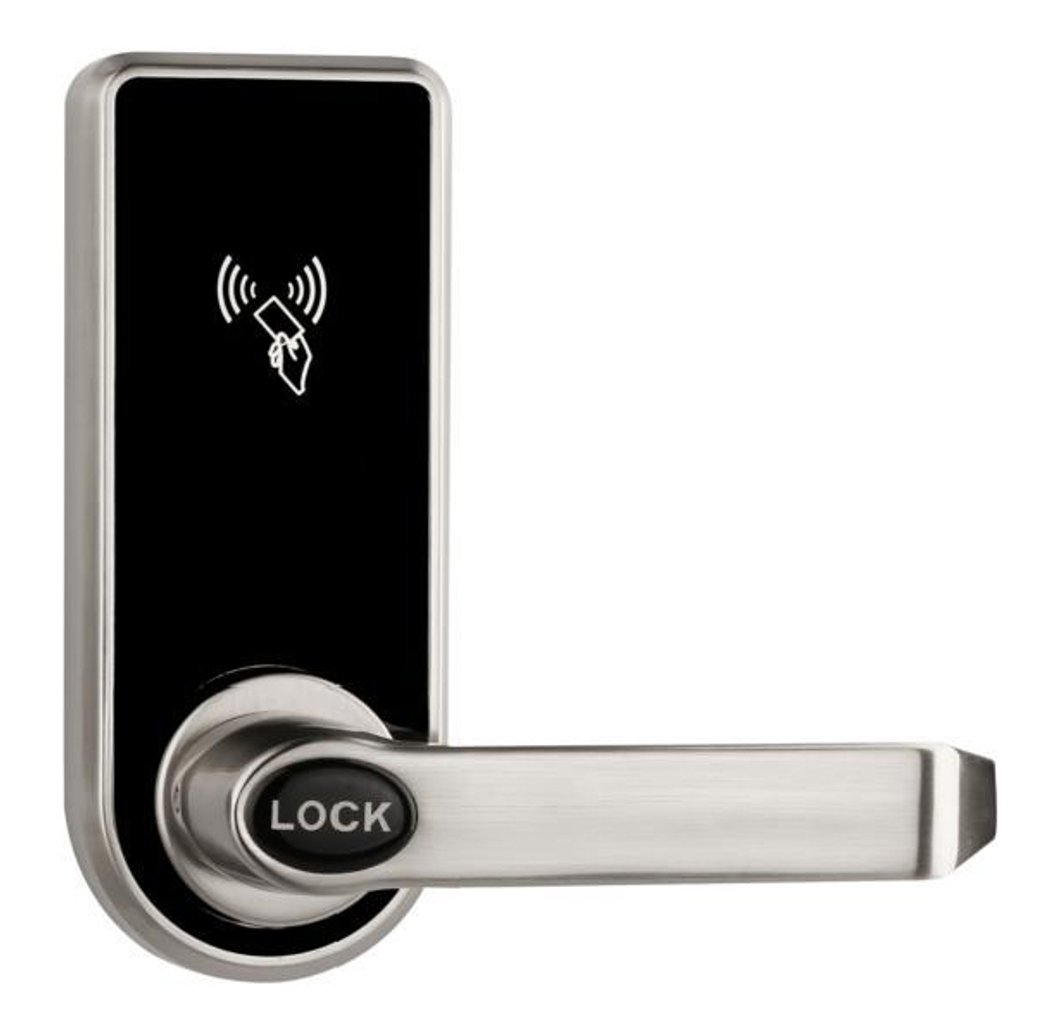
Hotel Smart Lock EK818 — RFID Card Mortise Lock for Guest Rooms
EK818 hotel smart lock: RFID card and mechanical key unlocking, zinc alloy panel in silver, single latch mini mortise, hotel or stand-alone PCB. 270+ hotel lock models. CE RoHS. OEM/ODM.
This page already points to it as the next recommended reference.
Related blog posts
1
Fingerprint Door Lock Selection Guide: How to Choose a Biometric Lock
A buyer-oriented fingerprint door lock selection guide: sensor types, recognition speed, accuracy, security, battery, certifications, and choosing a biometric lock for home and business.
It supports the same product context: Hotel Smart Lock EK818 — RFID Card Mortise Lock for Guest Rooms.
Specify your hotel project with our engineers
Send your room count, ceiling type, and protocol preference. We will return a sample plan and quote within 24 business hours.
- Move from general guidance into a product or application discussion.
- Use RFQ when pricing, drawings, MOQ, or launch timing needs structure.
- Keep a direct contact path visible for fast clarifications and handoff.