Mobile Credentials and Mobile Access Control: A Technical Guide
How mobile credentials and mobile access control work: Bluetooth and NFC mobile keys, credential delivery, security, and when a smartphone access control system fits a building.
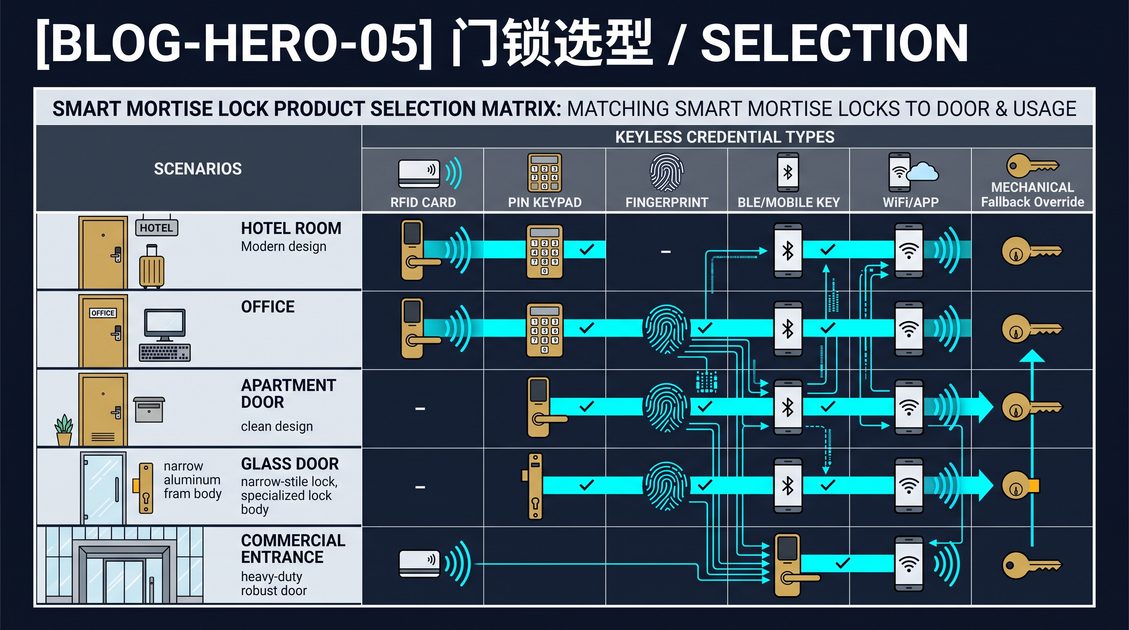
Mobile access control systems replace physical cards and keys with a smartphone as the credential, letting a phone unlock a door through Bluetooth Low Energy or NFC instead of presenting a card. A mobile credential is the digital authorization issued to the phone, and the system that manages, delivers, and revokes it is what turns a collection of smart locks into a mobile access control system. This technical guide explains how mobile credentials and mobile access control work, how they are secured, and when a smartphone access control system is the right choice for a home, a hotel, or a commercial building.
How Mobile Credentials Work
A mobile credential is a digital authorization stored on a smartphone that a door lock recognizes. When a user approaches a door, the phone and the lock communicate over Bluetooth Low Energy or NFC; the lock verifies that the phone holds a valid credential for that door and that time, and unlocks if the check passes. Unlike a card, which holds a fixed identifier, a mobile credential is issued and managed by a platform, so it can carry validity periods, schedules, and specific door rights, and it can be revoked remotely in seconds.
The credential is delivered to the phone through an app or a pass, and it can be issued in advance, which is what enables a fully contactless experience. In a hotel, a guest can receive a mobile key before arrival and go straight to the room; in an office, an employee can receive access on day one without a card. The issuing platform controls the lifecycle: it can extend, limit, or revoke the credential at any time. A mobile credential therefore behaves like a card that can be changed instantly and carries richer access rules.
Bluetooth, NFC, and the Access Control System
Mobile access control systems use Bluetooth Low Energy or NFC as the transport. Bluetooth Low Energy is the common choice because it allows the phone to be recognized as it approaches, enabling a hands-free unlock without taking the phone out; the range is short, so the lock only unlocks when the phone is genuinely near the door. NFC provides a deliberate tap, which is more secure against an accidental unlock and more battery-friendly, at the cost of requiring the phone to touch the reader. A system may support both, letting the building or the user choose.
The access control system is the management layer that makes mobile credentials practical. It enrolls users, issues credentials, defines which doors and which schedules a credential can access, and maintains an audit log of every entry. Because a smartphone credential is tied to a person and a platform, the system provides central control, instant revocation, and reporting that a physical card system can only approximate. For a hotel, an office, or a multifamily building, this central management is the primary reason to adopt mobile access control rather than cards.
Security of Mobile Access Control
A mobile credential must be secured against interception, cloning, and unauthorized use. The phone and the lock should authenticate over an encrypted channel, and the credential itself should be a protected digital key that cannot be copied from the phone. Mobile access control systems typically rely on secure element or hardware-backed storage on the phone and on time-limited or one-time credentials, so that even if the transport is observed, it cannot be replayed. The issuing platform must authenticate the user and manage the credential lifecycle with proper access controls.
Mobile access control also shifts security to the management layer. Because credentials are issued and revoked centrally, a lost or stolen phone can be blocked immediately, which is a security advantage over a lost card that remains valid until found. The trade-off is that the system depends on the reliability of the phone and the platform, so a well-designed system always keeps a fallback, such as a card, a keypad, or a mechanical key, for a guest with a dead phone. This guide recommends requiring encrypted transport, hardware-backed credentials, central revocation, and a documented fallback path when adopting mobile access control systems.
When to Choose Mobile Access Control
Mobile access control systems are the right choice when you manage many users, need remote issuance and revocation, and want a contactless experience. For a hotel, mobile keys reduce front-desk load and enable self-service arrival. For an office, mobile credentials simplify onboarding and offboarding and provide an audit trail. For a multifamily building, a mobile credential tied to a resident clarifies who-has-access and can be revoked instantly. The value grows with the number of doors and users, because that is where central management pays.
The trade-offs are the dependence on phones and platforms and the added system cost. A small home with one door and two users gains little from a full mobile access control system and may prefer a simpler keypad or card lock. A large building with many doors and users gains a great deal, but only if the platform is reliable, well-integrated with the property-management or building-access systems, and backed by a clear fallback. Match the sophistication of the system to the scale of the operation, and require central management, secure credentials, and a fallback path at every level of adoption.
Not sure which sensor fits your project?
Talk to our mmWave application engineers for a free consultation.
Specify your hotel project with our engineers
Send your room count, ceiling type, and protocol preference. We will return a sample plan and quote within 24 business hours.
- Move from general guidance into a product or application discussion.
- Use RFQ when pricing, drawings, MOQ, or launch timing needs structure.
- Keep a direct contact path visible for fast clarifications and handoff.