Fingerprint Door Lock Selection Guide: How to Choose a Biometric Lock
A buyer-oriented fingerprint door lock selection guide: sensor types, recognition speed, accuracy, security, battery, certifications, and choosing a biometric lock for home and business.
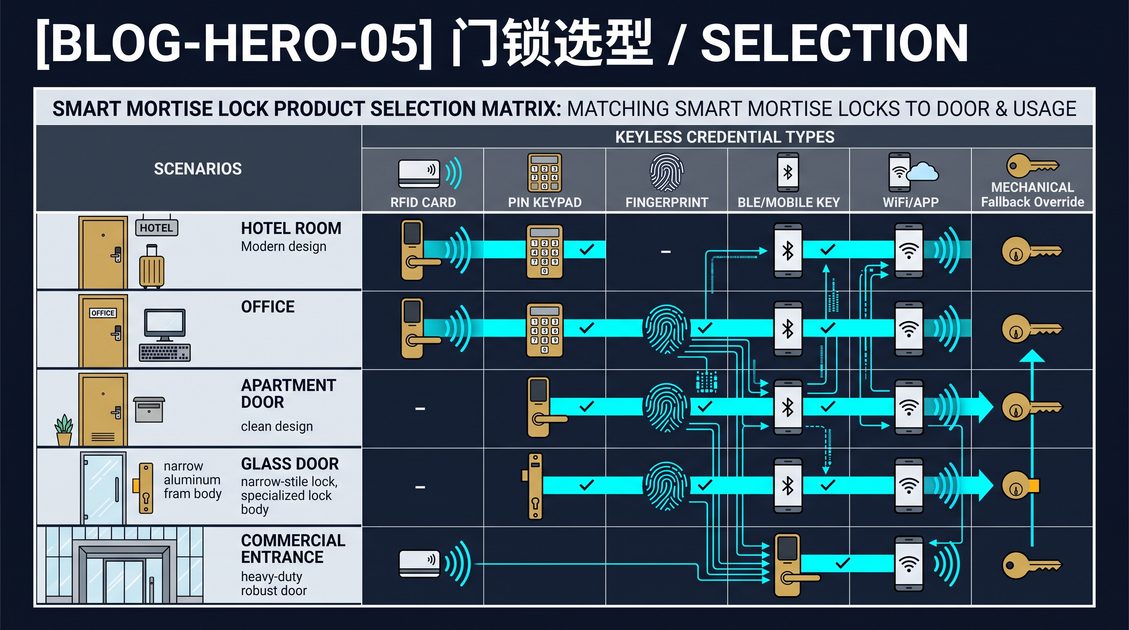
A fingerprint door lock is an electronic lock that unlocks when it recognizes an enrolled fingerprint, replacing a key or code with a biometric credential that cannot be lost, copied, or easily shared. A fingerprint sensor on the outside of the lock captures a ridge-and-valley pattern, converts it into a template, and compares it against templates stored in the lock to authenticate the user before driving the bolt. This fingerprint door lock selection guide is written for homeowners, landlords, hotel and office operators, and importers who need to compare biometric locks on technical criteria rather than marketing claims. Fingerprint locks have moved from a premium novelty to a mainstream and increasingly standard option on electronic mortise locks, and the buying decision now turns on sensor quality, recognition speed and accuracy, storage capacity, battery behavior, and security certifications. This guide breaks those criteria down in detail and ends with an actionable comparison and a practical checklist.
What Is a Fingerprint Door Lock and Why Biometrics Matter
A fingerprint door lock is an electromechanical lock whose primary credential is a fingerprint. The lock body contains a fingerprint sensor, a micro-controller, a template database, a motor or solenoid actuator, and a power source. When a user places a finger on the sensor, the device captures the print, extracts distinguishing features, and compares them against enrolled templates; on a match it authorizes the actuator to unlock the door. Because a fingerprint is unique to an individual and cannot be left at home or handed to a stranger in the way a key or code can, biometric locking removes the classic problems of lost keys, forgotten codes, and unauthorized copies.
Biometrics matter most where you need to authenticate a specific person rather than something they carry or remember. In a home, this means a family member unlocks with a finger instead of hunting for keys. In a rental or a managed building, a fingerprint is tied to a resident, which simplifies who-has-access questions and reduces the risk that a code is shared with a non-resident. In an office or facility, fingerprint access can be paired with an audit trail that shows which individual entered which door at which time. A fingerprint door lock therefore shifts access control from something-you-have or something-you-know to something-you-are, which is the strongest of the three authentication factors when it is implemented well.
The practical consequence of a biometric credential is that a fingerprint door lock is extremely convenient for frequent users, because there is nothing to carry, remember, or type. The trade-offs are that biometric sensors cost more than keypads or card readers, they can be affected by dirty, wet, or worn fingers, and they require careful enrollment and a well-designed fallback path in case a finger is injured or the sensor fails. A good fingerprint door lock pairs the biometric with a secondary method, such as a keypad, card, or mechanical key, so that a user is never locked out by a dry or damaged finger. This guide treats that redundancy as a core requirement, not an optional extra.
A fingerprint door lock uses a biometric credential, a fingerprint, instead of a key or code, so access is tied to a specific person and cannot be lost, copied, or easily shared. The lock captures a finger on a sensor, extracts features into a template, and compares against enrolled templates to authorize a motor or solenoid to unlock. Biometrics matter where you must authenticate an individual, such as a resident, tenant, employee, or guest, and where an audit trail of who entered is useful. The strength is convenience for frequent users and elimination of lost keys and shared codes. The trade-offs are higher cost than keypads, sensitivity to dirty or worn fingers, and the need for a reliable secondary method, such as a keypad, card, or mechanical key, so a user is never locked out by a dry finger or sensor fault.
Fingerprint Sensor Technology: Optical vs Semiconductor
The heart of a fingerprint door lock is the sensor, and the two dominant technologies are optical and semiconductor. An optical sensor shines light through a prism onto the finger and photographs the ridge-and-valley pattern; it is the older, lower-cost technology and is commonly seen on access terminals and budget locks. A semiconductor sensor, also called capacitive or active, measures the electrical capacitance differences across the ridges and valleys when a finger touches the sensor chip; it is more compact, more accurate, and more resistant to spoofing with a printed image, which is why it dominates modern electronic locks, especially mobile and mortise form factors.
The differences show up in real use. Optical sensors are more tolerant of dry and worn fingers because they capture a visual image rather than an electrical reading, and they are inexpensive, but they are larger and can be spoofed more easily by a high-resolution photograph of a print. Semiconductor sensors are smaller, faster, and harder to fool because they require the electrical contact of living skin, but they can be more sensitive to dry, very wet, or calloused fingers, and they cost more. Some advanced sensors use ultrasonic or other active methods that read through the outer layer of skin, which is more reliable across finger conditions and even works with some gloves, but these are typically more expensive and less common in residential locks.
The right sensor choice depends on your users and your environment. For a high-traffic office, hotel, or commercial mortise lock where speed and resistance to spoofing matter, a semiconductor or ultrasonic sensor is the better investment. For a budget home lock where cost dominates and users have normal, dry fingers, a good optical sensor can be perfectly adequate. What matters more than the raw technology is the recognition algorithm behind it, because a mediocre algorithm on a good sensor can be slower and less accurate than a strong algorithm on a cheaper sensor. This guide recommends testing real unlock speed and reliability with actual users rather than choosing on sensor type alone, and asking the supplier for the specified recognition time, false-acceptance rate, and false-rejection rate.
The sensor is the heart of a fingerprint door lock, and the two dominant types are optical and semiconductor. An optical sensor photographs the ridge-and-valley pattern through a prism and is older, lower-cost, and tolerant of dry fingers but larger and more easily spoofed by a printed image. A semiconductor or capacitive sensor measures electrical capacitance across the finger and is more compact, faster, accurate, and spoof-resistant, but can be sensitive to dry, wet, or calloused fingers and costs more. Advanced ultrasonic sensors read through the outer skin for reliability across finger conditions. For high-traffic commercial mortise locks, prefer semiconductor or ultrasonic for speed and spoof resistance; for budget home locks, a good optical sensor suffices. The recognition algorithm matters more than raw sensor type, so test real unlock speed and ask for specified recognition time, false-acceptance, and false-rejection rates.
Recognition Speed, Accuracy, and Storage Capacity
Three technical specifications define how well a fingerprint door lock actually works in daily use: recognition speed, accuracy, and storage capacity. Recognition speed is the time from placing a finger to the lock authorizing, commonly specified in milliseconds; a fast lock feels effortless, while a slow lock becomes a daily annoyance. Most modern fingerprint door locks specify recognition in roughly 300 to 500 milliseconds, and the very fastest claim under 200 milliseconds. Accuracy is expressed by two error rates: the false-acceptance rate, the chance an unenrolled fingerprint is wrongly accepted, and the false-rejection rate, the chance an enrolled fingerprint is wrongly rejected. A good biometric lock targets a false-acceptance rate below 0.001 percent and a false-rejection rate low enough that legitimate users rarely fail.
Storage capacity is how many fingerprints the lock can enroll, which matters more than most buyers expect. A single-family lock may only need a handful of enrolled prints, but an office, hotel, or shared building may need to enroll many residents, staff, or guests, and each user may want more than one finger enrolled. Typical capacity ranges from about 50 to a few hundred templates on consumer locks, while commercial and enterprise biometric readers support thousands. If your deployment enrolls many people, choose a lock whose capacity comfortably exceeds your projected user count with headroom, and confirm whether capacity is per-lock or managed centrally.
Accuracy and capacity are not independent of sensor quality and algorithm. A semiconductor sensor with a strong algorithm achieves better accuracy at a given speed than a weak optical setup, and a lock that stores templates in a secure element resists template extraction. For a property manager or OEM buyer, it is worth asking the supplier for the specified false-acceptance and false-rejection rates and the recognition time in the datasheet, and to treat unusually low storage capacity as a red flag on a so-called commercial lock. In practice, real-world accuracy depends on enrollment quality and finger condition, so a lock that lets a user enroll multiple templates per finger improves reliability significantly.
Three specifications define daily usefulness: speed, accuracy, and capacity. Recognition speed, from finger placement to authorization, is typically 300 to 500 milliseconds, with the fastest under 200 milliseconds. Accuracy is expressed by false-acceptance rate, the chance an unenrolled fingerprint is wrongly accepted, ideally below 0.001 percent, and false-rejection rate, the chance an enrolled fingerprint is wrongly rejected, which must stay low so legitimate users rarely fail. Storage capacity is the number of enrolled fingerprints, from about 50 to a few hundred on consumer locks to thousands on enterprise readers; match it to projected users with headroom. A semiconductor sensor with a strong algorithm achieves better accuracy at a given speed than a weak optical setup, and secure-element template storage resists extraction. Ask suppliers for the datasheet values and treat low capacity on a commercial claim as a red flag.
Security: Spoofing Resistance and Template Protection
The security of a fingerprint door lock depends on how well it resists two attacks: spoofing the sensor and extracting the template. Spoofing is presenting a fake fingerprint, such as a printed image, a molded copy, or a high-resolution lifted print, to trick the sensor. A lock's spoof resistance is determined by its sensor type and its liveness detection. Semiconductor and ultrasonic sensors are inherently harder to spoof than optical because they require the electrical or acoustical properties of living skin, and the best sensors add liveness detection that checks for features such as blood flow or skin elasticity. A low-cost optical sensor with no liveness detection can be defeated by a good photograph, which is why it is not recommended for high-security doors.
Template protection is the second and often overlooked dimension. A fingerprint cannot be changed like a password; once a biometric template is compromised, the user cannot be issued a new fingerprint. A secure system therefore stores templates in an encrypted form in a secure element, never in plaintext, and never transmits raw fingerprint images. Ask how templates are stored and whether the lock can be used offline without transmitting biometric data to a cloud service, because a lock that uploads fingerprints to a server you do not control creates a privacy and security exposure. For commercial deployments subject to data-protection regulations, template protection and on-device storage are increasingly a compliance requirement.
Security claims must be verified, not assumed. A fingerprint door lock may advertise "biometric security" while using a weak sensor and plaintext storage, so the buyer should request the sensor type, the liveness-detection method, the template-encryption approach, and, where available, certification against a biometric standard such as ISO/IEC 30107 for presentation-attack detection. This guide treats spoof resistance and template protection as non-negotiable for any door protecting valuables, people, or regulated data, and recommends pairing the biometric with a secondary credential and a mechanical key override as defense in depth. A biometric lock is a convenience multiplier only when its security is engineered, not merely claimed.
Security of a fingerprint door lock rests on resisting spoofing and template extraction. Spoofing means presenting a fake fingerprint such as a printed image, molded copy, or lifted print; resistance depends on sensor type and liveness detection. Semiconductor and ultrasonic sensors are harder to fool because they read the electrical or acoustical properties of living skin, and the best add liveness detection such as blood-flow checks, while a low-cost optical sensor with no liveness check can be defeated by a photograph. Template protection matters because a fingerprint cannot be changed like a password: templates should be stored encrypted in a secure element, never in plaintext, and never uploaded to an uncontrolled cloud. Buyers should verify sensor type, liveness method, template encryption, and certification such as ISO/IEC 30107 for presentation-attack detection, and pair the biometric with a secondary credential and a mechanical override as defense in depth.
Battery Life, Power, and Emergency Access on Biometric Locks
A fingerprint sensor draws power every time it reads a finger, so battery planning is important and specific to biometric locks. Each recognition event energizes the sensor, the processing, and the actuator, and a lock with an active sensor will consume more than a passive keypad. Expected battery life for a fingerprint door lock typically ranges from six months to a year and a half depending on unlock frequency, sensor type, radio use, and temperature, with frequent daily unlocks draining faster. A lock that reports battery level to an app and warns at a defined threshold gives the owner weeks of notice; without that warning, a biometric lock can fail suddenly, and because there is no keypad, the user has no alternative credential if the battery dies and the sensor stops.
Emergency access is therefore a design requirement on a fingerprint door lock. The common solutions are a secondary credential, such as a keypad or card, a mechanical key override, and a backup power port such as a USB or 9V terminal on the outside of the lock. The best biometric locks combine a keypad or card with the fingerprint and a mechanical key, so that a dry finger, a sensor fault, or a dead battery never strands a user. A lock with only a fingerprint and no fallback is risky even if the sensor is excellent, because biometrics are inherently variable: hands get wet, dirty, calloused, or injured, and a user cannot re-enroll on the spot if the primary finger fails.
For commercial and rental deployments, battery management scales into an operational concern. A property manager with many biometric locks needs central battery reporting so maintenance replaces batteries on schedule rather than responding to a locked-out tenant with no keypad. Networked fingerprint locks report battery status centrally, and some support hot-swappable cells to avoid any downtime. This guide recommends, for any multi-door deployment, a fingerprint door lock with a secondary credential, a documented battery threshold, central battery reporting where available, and a clear emergency-access path, and to budget battery replacement as a recurring operating cost rather than a surprise.
A fingerprint sensor draws power on every read, so battery planning is specific to biometric locks: expected life ranges from six months to a year and a half depending on unlock frequency, sensor type, radio use, and temperature, with frequent unlocks draining faster. Without a battery-level warning, a biometric lock can fail suddenly, and with no keypad the user has no alternative credential. Emergency access is therefore a design requirement: combine the fingerprint with a keypad or card, a mechanical key override, and a backup power port such as USB or 9V on the outside. A lock with only a fingerprint and no fallback is risky because hands get wet, dirty, calloused, or injured. For commercial and rental deployments, choose networked locks with central battery reporting and hot-swappable cells, and budget replacement as a recurring operating cost.
Fingerprint Mortise Locks vs Cylindrical and Deadbolt Locks
The form factor of a fingerprint door lock is as important as the sensor, and the dominant choices are the mortise lock and the cylindrical or deadbolt lock. A fingerprint mortise lock houses the biometric reader and electronics in a rectangular lock body fitted into a pocket cut into the door edge, and it is the standard for commercial, hotel, and European residential doors. A fingerprint deadbolt or cylindrical lock uses the two-part cylindrical chassis typical of North American doors, with the fingerprint reader on the exterior trim. Both can be excellent, but they are not interchangeable, and the choice is dictated by the door, not by preference.
The mortise form factor carries distinct advantages for biometrics. The larger body provides more room for the sensor, the processor, the actuator, and additional credential readers such as a keypad or card reader, and it supports a full handle set, which matters for accessibility and for door designs that require a lever. A mortise lock also integrates a deadbolt and latch in one assembly, which is more secure and more versatile across entry, corridor, and interior doors. The trade-off is that mortise locks are more complex, more expensive, and harder to retrofit than a cylindrical lock because the pocket is standardized by regional norms and not easily enlarged.
For most buyers choosing between a fingerprint mortise lock and a fingerprint deadbolt, the decision is architectural. If the door already has a mortise pocket, the cleanest upgrade is an electronic fingerprint mortise lock that drops in and preserves the handle set. If the door uses a standard US deadbolt, a retrofit fingerprint deadbolt is simpler and cheaper to install. For new construction, specifying a mortise lock with a fingerprint reader opens the widest functionality. This guide notes that for commercial, hotel, and property-management projects, the fingerprint mortise lock is usually the right backbone, while for a single-family retrofit a fingerprint deadbolt may be the pragmatic choice; the same selection criteria apply to both.
The form factor is as important as the sensor: the dominant choices are mortise and cylindrical or deadbolt. A fingerprint mortise lock houses the reader and electronics in a rectangular body fitted into a pocket in the door edge, standard for commercial, hotel, and European doors, and provides room for the sensor, processor, actuator, and additional readers such as a keypad or card. A fingerprint deadbolt uses the North American cylindrical chassis with the reader on the exterior trim. Mortise advantages include more space for biometrics, a full handle set, and an integrated deadbolt and latch, but higher complexity and cost and harder retrofits. Choose by the door: a fingerprint mortise lock drops into an existing pocket for the cleanest upgrade, a retrofit fingerprint deadbolt is simpler on a standard US door, and new construction favors specifying a mortise lock for the widest functionality.
Choosing a Fingerprint Door Lock for Home, Business, and Multifamily
The right fingerprint door lock depends heavily on who owns and operates the door, so this guide separates the recommendation by deployment type. For a single-family home, the priorities are a reliable sensor, a fallback credential, easy enrollment for family members, and integration with the owner's phone. A fingerprint front door lock with a keypad and a mechanical key, moderate capacity, and app control is usually ideal, and battery life of a year or more is realistic at normal household unlock frequency. A homeowner rarely needs networked management and can choose a standalone lock.
For a business or office, the priorities shift to capacity, audit, and management. An office fingerprint door lock should enroll many employees, support time-based schedules, provide an audit trail, and allow an administrator to revoke access immediately when someone leaves. This usually means a networked lock with a management platform rather than a standalone device, and a sensor with strong spoof resistance because the door may protect equipment, data, or cash. For a small business, a lightweight gateway-based system is often the right balance between cost and control.
For multifamily and property management, the fingerprint door lock must scale and integrate. A property manager needs to enroll many residents, issue and revoke access centrally, and pair the unit lock with a building entry system. The fingerprint is tied to a resident, which simplifies who-has-access questions, and a networked platform provides the audit and scheduling the operation requires. Total cost of ownership across many doors, including the management software subscription, dominates the decision. In all three cases, this guide recommends pairing the fingerprint with a keypad or card, choosing a certified lock, and testing real-world recognition with actual users before committing to a deployment.
The right fingerprint door lock depends on who operates the door. For a single-family home, prioritize a reliable sensor, a fallback credential such as a keypad and mechanical key, easy enrollment, and app control; a standalone lock with a year or more of battery life is usually ideal. For a business or office, prioritize capacity, audit, and management: a networked lock that enrolls many employees, supports time schedules, provides an audit trail, and allows instant revocation, with strong spoof resistance for the door. For multifamily and property management, the lock must scale and integrate: enroll many residents, issue and revoke access centrally, and pair unit locks with a building entry system, with total cost of ownership including the software subscription dominating the decision. In all cases, pair the fingerprint with a keypad or card, choose a certified lock, and test real-world recognition before committing.
Certifications and Compliance for Fingerprint Door Locks
A fingerprint door lock that protects a building should meet recognized certification and compliance requirements, and this guide treats them as verification, not marketing. The most common are CE for the European market, FCC for the United States, and RoHS for restricted substances. CE indicates conformity with European safety and electromagnetic compatibility requirements, including the radio requirements of the wireless modules in the lock; FCC covers radio emission limits in the United States. RoHS restricts hazardous substances in the electronics, and, for markets with packaging and battery rules, additional compliance such as REACH or battery regulations may apply. An importer should request the certificates and verify the certificate number matches the exact model.
For biometric locks specifically, data protection and privacy compliance are increasingly relevant. Storing and processing fingerprints is regulated in many jurisdictions, and a lock that keeps templates on-device in encrypted form, rather than uploading raw biometric data to an uncontrolled cloud, is both more secure and more likely to comply with data-protection requirements. This guide recommends asking where the fingerprint data is stored, whether it is encrypted, who can access it, and whether the device operates offline, because these answers determine both security and regulatory exposure.
For higher mechanical and security claims, look for UL or ANSI/BHMA grading, or equivalent national standards, which grade the lock's strength, cycle life, and resistance to attack, and for biometric-specific standards such as ISO/IEC 30107 for presentation-attack detection. A lock that is certified to these standards has been independently tested, whereas a lock that merely claims compliance has not. A buyer deploying at scale should request the certificate files, confirm the model and firmware version, and, where the standard is optional, treat it as a competitive differentiator rather than an assumption.
Certification and compliance verify a fingerprint door lock rather than market it. Common requirements are CE for the European market, FCC for the United States, and RoHS for restricted substances, covering safety, electromagnetic compatibility, radio limits, and hazardous materials; an importer should request the certificates and verify the number matches the exact model. For biometric locks, data protection and privacy compliance matter because fingerprints are regulated data: prefer templates stored encrypted on-device, never uploaded raw to an uncontrolled cloud, and confirm the device operates offline. For higher mechanical and security claims, look for UL or ANSI/BHMA grades and biometric-specific standards such as ISO/IEC 30107 for presentation-attack detection. A certified lock has been independently tested; request certificate files and confirm the model and firmware version rather than assuming compliance.
Cost, MOQ, and Buying from a Manufacturer or Importer
For homeowners the fingerprint door lock is a one-time purchase, but for a business, a property manager, or an importer the economics are very different, and this guide addresses the volume buyer explicitly. The unit cost of a fingerprint door lock drops sharply with volume, and the decision criteria change from "which model" to "which manufacturer." An importer or OEM evaluating a fingerprint mortise lock supplier should verify the certifications, the sensor quality and the specified recognition and accuracy rates, the MOQ, the lead time, the payment terms, and the availability of customization such as branding, finishes, and handle sets. These are the dimensions a datasheet rarely fully captures and an audit of the factory reveals.
MOQ, minimum order quantity, is the entry barrier for volume buyers. Fingerprint mortise locks typically carry a higher MOQ than simpler keypad locks because of the sensor and the calibration of the biometric module, and the MOQ often scales with the level of customization. A buyer should confirm the MOQ for the standard model and for a customized model separately, because the custom MOQ is frequently higher. Lead time, the interval from order to delivery, depends on inventory and customization and should be committed in writing. Payment terms, commonly including a deposit with balance before shipment, protect both sides of a cross-border transaction.
For any volume buyer, this guide recommends treating the manufacturer relationship as part of the purchase. Ask for a factory audit or a video walkthrough, request reference deployments, and confirm the after-sales support model, including warranty, spare parts, and technical documentation. A fingerprint door lock is an engineered product, and the difference between a reliable supplier and an unreliable one shows up over years of operation, not on the first order. Buying directly from a manufacturer of smart mortise locks, rather than through an unnamed aggregator, gives the buyer a single accountable source for the hardware, the certification, and the support.
For a homeowner a fingerprint door lock is a one-time purchase, but for a business, property manager, or importer the economics shift to unit cost, MOQ, and supplier reliability. An importer evaluating a fingerprint mortise lock should verify certifications, sensor quality, specified recognition and accuracy rates, MOQ, lead time, payment terms, and customization such as branding, finishes, and handle sets. MOQ is the entry barrier and is typically higher for fingerprint locks because of the sensor and biometric-module calibration, and it often scales with customization; confirm the standard and custom MOQ separately. Lead time should be committed in writing, and payment terms commonly include a deposit with balance before shipment. Treat the manufacturer relationship as part of the purchase: request a factory audit or walkthrough, reference deployments, and confirm warranty, spare parts, and after-sales support, because reliability shows up over years, not on the first order.
FAQ: Fingerprint Door Lock Selection Guide
Are fingerprint door locks secure?
Security depends on sensor type, liveness detection, and template protection. Semiconductor and ultrasonic sensors with liveness detection are hard to spoof; templates should be stored encrypted on-device, never plaintext or uploaded to an uncontrolled cloud. Request the sensor type, liveness method, and certifications such as ISO/IEC 30107 and CE, FCC, RoHS.
What if the sensor does not recognize my finger?
Dry, wet, dirty, or calloused fingers can cause false rejections. Choose a lock with a secondary credential, such as a keypad or card, and a mechanical key override, and enroll multiple templates per finger to improve reliability. A lock with no fallback is risky.
What happens when the battery dies?
A good lock warns in advance and provides emergency access via a keypad, card, mechanical key, or backup power port such as USB or 9V on the outside. Never choose a biometric lock without a clear emergency-access path.
How many fingerprints can a lock store?
Consumer locks typically store about 50 to a few hundred templates, while commercial readers support thousands. Match capacity to projected users with headroom, and enroll multiple fingers per user where the lock allows.
Can a fingerprint lock be installed on my existing door?
It depends on the form factor. A fingerprint mortise lock drops into an existing mortise pocket and preserves the handle set; a fingerprint deadbolt fits a standard US door. Measure backset, thickness, and handedness and compare to the lock's specifications.
Do I need app or networked control?
For a home, a standalone lock with an app is usually enough. For a business or multifamily, a networked lock with a management platform provides central enrollment, scheduling, audit, and instant revocation, and central battery reporting.
Conclusion: Choose the Fingerprint Door Lock That Fits Your Users
This fingerprint door lock selection guide has covered sensor technology, recognition speed, accuracy, capacity, security, battery, form factor, deployment type, certification, and cost. The unifying recommendation is to pair a strong, certified sensor with a fallback credential and a mechanical override, and to match capacity and management to the number and type of users. A fingerprint door lock is a genuine convenience and a genuine security upgrade only when its biometric path is reliable and its security is engineered rather than claimed.
Apply this guide as a checklist. Measure the door and confirm the form factor, verify the sensor type and the specified recognition and accuracy rates, require template protection and certification, plan for battery and emergency access, and choose standalone or networked management by deployment size. Whether you are protecting a single home or deploying across a multifamily building, a well-chosen fingerprint door lock tied to a certified electronic mortise lock is one of the most reliable access-control decisions you can make.
Part of this article content is generated by AI and optimized for professional accuracy and readability.
Not sure which sensor fits your project?
Talk to our mmWave application engineers for a free consultation.
Find the right presence sensor for your hotel project
Compare the 3 protocols, check hotel-specific case studies, and download the installation guide
Related products
1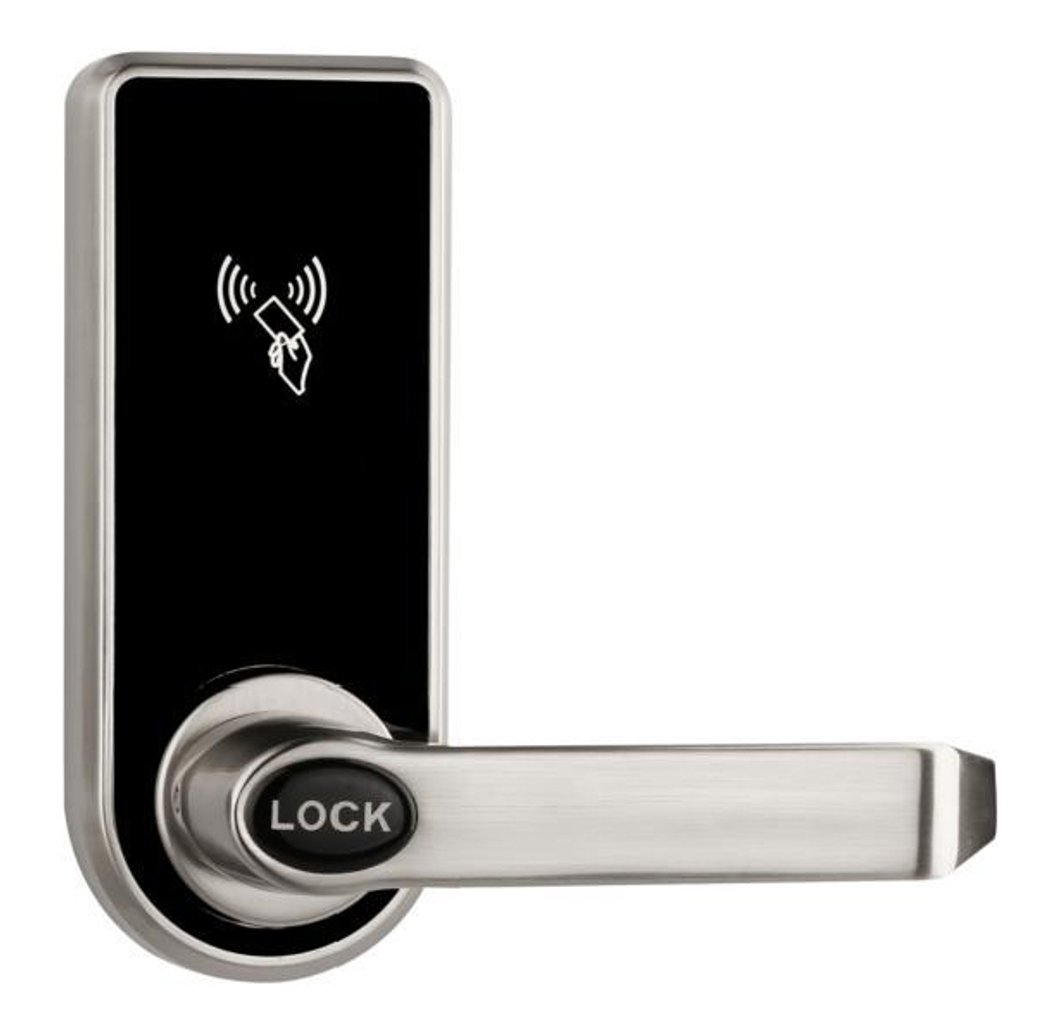
Hotel Smart Lock EK818 — RFID Card Mortise Lock for Guest Rooms
EK818 hotel smart lock: RFID card and mechanical key unlocking, zinc alloy panel in silver, single latch mini mortise, hotel or stand-alone PCB. 270+ hotel lock models. CE RoHS. OEM/ODM.
This page already points to it as the next recommended reference.
Related blog posts
1
Smart Door Locks Selection Guide: How to Choose the Right Electronic Lock
A complete buyer-oriented smart door locks selection guide: opening methods, connectivity, battery, security, standards, and retrofit considerations for home and commercial doors.
It supports the same product context: Hotel Smart Lock EK818 — RFID Card Mortise Lock for Guest Rooms.
Specify your hotel project with our engineers
Send your room count, ceiling type, and protocol preference. We will return a sample plan and quote within 24 business hours.
- Move from general guidance into a product or application discussion.
- Use RFQ when pricing, drawings, MOQ, or launch timing needs structure.
- Keep a direct contact path visible for fast clarifications and handoff.