Code Lock Guide for PIN and Digital Door Access
A practical code lock guide covering PIN policies, keypad fit, temporary access, security, battery recovery, privacy, and choosing a digital code lock.
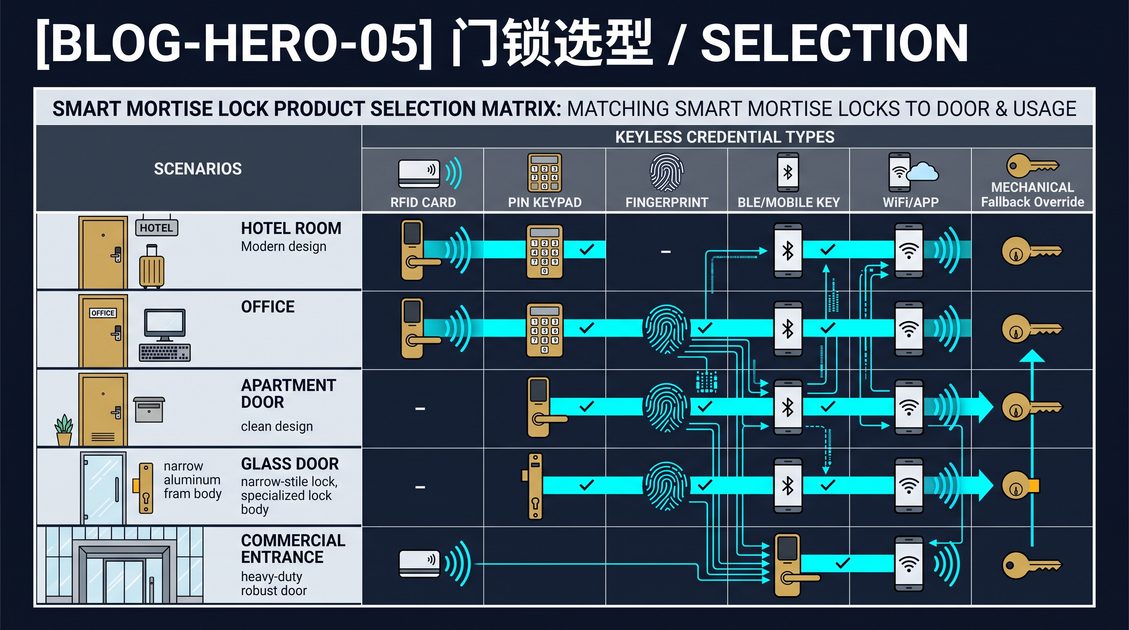
A code lock is an electronic door lock that authenticates a user with a numeric PIN instead of a physical key, card, or biometric. It can be a simple standalone keypad or part of a networked access-control system that issues individual codes, schedules temporary access, and records events. This code lock guide explains how to select a keypad, create a responsible PIN policy, manage temporary credentials, plan battery recovery, and protect the door from misuse.
Code Lock Guide: Keypad and Door Fit
Start with the door, not the keypad. Confirm whether the opening needs a cylindrical deadbolt, a mortise lock, or an electrified lock body, and measure thickness, backset, handing, strike, frame, and available mounting space. The keypad should be reachable, weather-appropriate, and compatible with the lock body. A code lock on a commercial or fire-rated door may require professional review before modification.
Test the door mechanically before configuring codes. The latch and bolt should move smoothly, the door should close without excessive pressure, and the keypad should provide clear feedback for the intended users.
Code Lock Guide: PIN Policy and Temporary Access
Use individual PINs when accountability matters and avoid one shared code for every user. Set a reasonable length, limit failed attempts, and define how codes are created, changed, expired, and revoked. Temporary codes should have an automatic end time, particularly for guests, contractors, cleaners, and service providers.
Protect PIN privacy from shoulder surfing and public display. Keep administrator permissions separate from daily user access, and record who issued or revoked a code. A networked system can manage these operations centrally, while a standalone lock requires a local procedure.
Code Lock Guide: Power, Security, and Recovery
A code lock should report low battery and provide a mechanical key, backup power terminal, or another emergency path. Confirm what remains functional during a network outage. Security also depends on the keypad’s resistance to repeated guessing, the protection of stored codes, and the encryption of any connected management channel.
This code lock guide is general information. Confirm fire, accessibility, electrical, privacy, building, and emergency-egress requirements with qualified professionals. A good code lock combines a correct physical fit with controlled PIN administration and a tested recovery procedure.
An operator should review a code lock after deployment rather than treating configuration as finished. Check whether users share codes, whether expired credentials remain active, and whether failed attempts generate the expected alert. Rotate administrator credentials, remove installer access, and keep the emergency recovery method under controlled custody. For a commercial door, record the opening, the code owner, the expiry policy, and the maintenance contact. This operating record turns a code lock from a keypad product into a manageable access-control component.
A code lock should be chosen with the intended users in mind. A family or small team may be well served by a small number of codes, while a large building needs individual codes, expiry, and remote administration. Consider the visibility and lighting of the keypad, the reach for a person in a wheelchair or carrying objects, and the availability of an alternative method for a guest who is unfamiliar with the property. Plan how many codes the lock can store and whether that is enough with headroom. Recording the code policy and the responsible administrator makes the lock predictable to operate and easy to audit.
A code lock is only as trustworthy as its code discipline. Agree on a minimum code length, discourage users from choosing predictable sequences, and remove a code the moment a person leaves or a temporary access ends. If the lock can report failed attempts, review them regularly, because a pattern of repeated failures may indicate guessing, an authorized user who has forgotten their code, or a sensor problem. Written records of code creation and revocation help a property manage many users and defend an access decision.
Before handover, test the code lock with a new code, an expired code, a revoked code, and a deliberately incorrect code. Confirm the expected feedback and lockout behavior, then give the operating team a written recovery procedure. This small test proves that the code policy exists in the actual device rather than only in a purchase document.
Part of this article content is generated by AI and optimized for professional accuracy and readability.
Not sure which sensor fits your project?
Talk to our mmWave application engineers for a free consultation.
Specify your hotel project with our engineers
Send your room count, ceiling type, and protocol preference. We will return a sample plan and quote within 24 business hours.
- Move from general guidance into a product or application discussion.
- Use RFQ when pricing, drawings, MOQ, or launch timing needs structure.
- Keep a direct contact path visible for fast clarifications and handoff.