Biometric Security Solutions Guide for Doors and Buildings
A practical biometric security solutions guide covering fingerprints, facial recognition, template protection, access management, privacy, and deployment decisions.
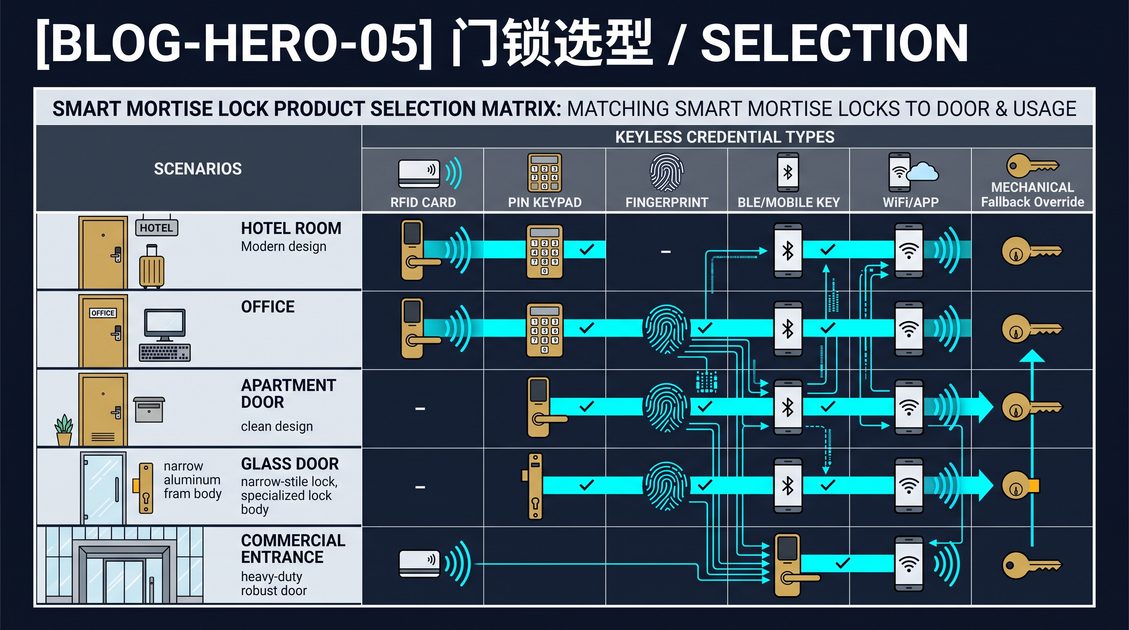
Biometric security solutions use a biological trait, usually a fingerprint or face, to identify a person before granting access to a door, building, or controlled area. They can remove shared keys and codes, provide individual accountability, and integrate with electronic mortise locks and centralized access management. This biometric security solutions guide explains the main biometric types, accuracy and privacy considerations, fallback design, and how to choose a responsible solution for a home, office, hotel, or multifamily property.
Biometric Security Solutions: Fingerprint and Face
Fingerprint readers capture ridge-and-valley features through optical, semiconductor, or other sensing methods. They are generally compact and economical, but performance depends on finger condition and enrollment quality. Facial recognition uses a camera and an algorithm to identify a person at a distance, providing hands-free access but requiring more processing, power, and careful privacy controls.
Neither method is automatically secure. A biometric solution should specify false-acceptance and false-rejection behavior, liveness or presentation-attack detection where appropriate, and the fallback credential. A user with an injured finger or a covered face needs a safe alternative such as a card, PIN, mobile credential, or mechanical key.
Biometric Security Solutions: Template Protection
A biometric template cannot be changed like a password, so it should be stored encrypted in a secure element or other protected location and processed locally where possible. Avoid systems that transmit raw fingerprint images or face images to an uncontrolled service. Ask where the data is stored, who can access it, how it is deleted, and how the system supports applicable privacy obligations.
Access management should separate enrollment, administration, audit review, and daily use. The platform should revoke a user when employment, tenancy, or a project ends, and it should record who changed a biometric permission. Collect only the biometric data needed for the stated access purpose.
Biometric Security Solutions: Deployment and Testing
Choose the door form factor and management architecture with the biometric reader. A fingerprint reader may be integrated into a smart mortise lock, while a building system may use a reader connected to a central controller. Test real users in the intended lighting, temperature, and traffic conditions, and confirm behavior during network loss, power failure, and sensor rejection.
This biometric security solutions guide is general information. Confirm privacy, accessibility, fire, electrical, building, and emergency-egress requirements with qualified professionals. A responsible biometric deployment combines accurate sensing, protected templates, a reliable fallback, clear consent and retention policies, and trained operators.
A procurement review should also consider inclusion and fallback. Some users may not consent to biometric enrollment, may have a temporary injury, or may work in conditions that make a sensor unreliable. Provide an approved card, PIN, or staffed recovery route and explain it before deployment. Test enrollment removal when a person leaves, verify that an administrator cannot view unnecessary raw biometric data, and keep the documented retention and deletion process current. These controls make biometric security solutions practical for real teams rather than only for a controlled demonstration.
A deployment should include an enrollment plan that produces consistent templates. Train users to present the approved finger or face position, record multiple samples where the hardware allows, and re-enroll a user whose appearance changes. After enrollment, verify that each person can unlock reliably and that the false-rejection rate is acceptable in practice. Keep a short troubleshooting procedure at the door so a rejected user is not left stuck. Finally, link the biometric solution to the audit and offboarding process, so that when a person leaves, their template is removed, their access is revoked, and the change is recorded. A biometric system that is easy to enroll and easy to remove is far more operationally useful than one that is only impressive during a demonstration.
The monitoring plan matters as much as the enrollment plan. Decide who reviews false-rejection events, who can temporarily override a locked user with an approved fallback, and which staff can export or erase audit data. Publishing these controls before launch helps the property demonstrate that biometric security solutions operate transparently and can be withdrawn quickly. When combined with a mechanical or staffed recovery route, a biometric door becomes a practical, accountable access option rather than a rigid barrier.
Part of this article content is generated by AI and optimized for professional accuracy and readability.
Not sure which sensor fits your project?
Talk to our mmWave application engineers for a free consultation.
Specify your hotel project with our engineers
Send your room count, ceiling type, and protocol preference. We will return a sample plan and quote within 24 business hours.
- Move from general guidance into a product or application discussion.
- Use RFQ when pricing, drawings, MOQ, or launch timing needs structure.
- Keep a direct contact path visible for fast clarifications and handoff.