Access Control Keypad Guide for Secure Door Planning
This access control keypad guide explains how to match credentials, locks, power, connectivity, accessibility, and maintenance to reliable entry.
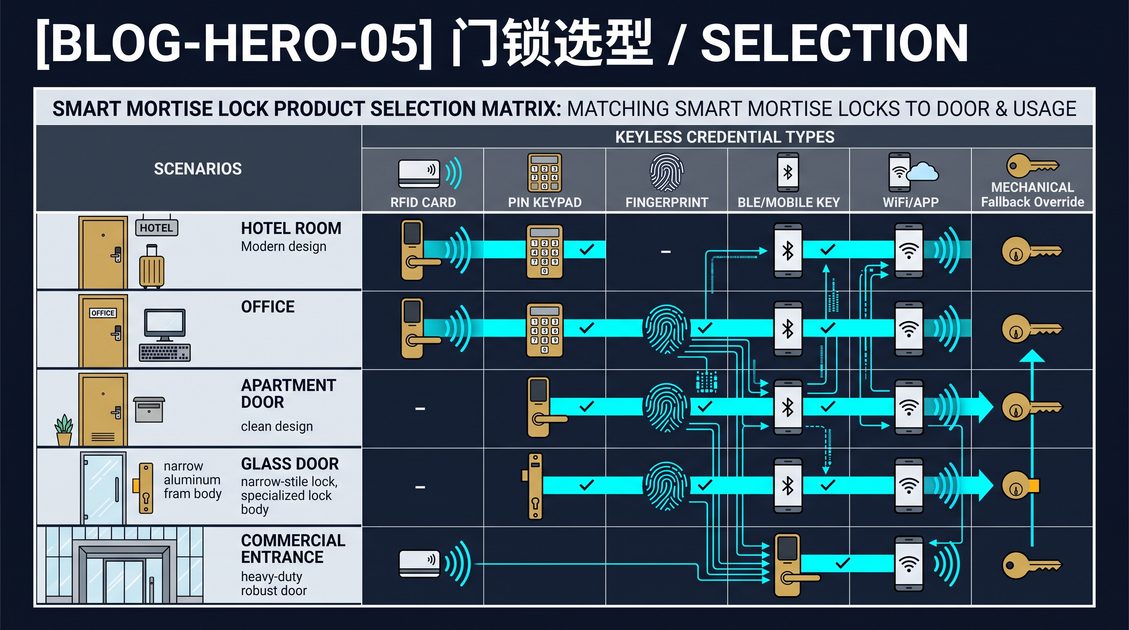
An access control keypad is an entry device that verifies a numeric credential and releases a compatible lock, strike, or controller when authorization rules are satisfied. The right system combines a suitable PIN policy with door hardware, power, egress, environmental protection, administrator controls, and a documented recovery method. Standalone keypads can serve small offices, storage rooms, and staff doors, while networked systems support schedules, individual credentials, audit events, and remote revocation across larger properties. A keypad is not a complete security solution: weak door construction, shared codes, poor alignment, or untested emergency behavior can defeat a technically capable device. Treat the opening as one engineered system and test the exact configuration before routine use.
Access control keypad guide: define the door and users
An access control keypad guide starts with the opening, because a reader cannot correct an unsuitable lock or unsafe egress arrangement. Begin by recording door material, thickness, handing, frame condition, hinges, closer, latch, strike, mortise case, and existing access equipment. Then identify user groups, traffic volume, operating hours, weather exposure, and whether visitors or contractors need temporary entry. A private office may need a few named users; a shared facility may require hundreds of time-limited credentials and central administration. Separate authentication from the physical security decision: the keypad confirms a credential, while the lock must hold the door and release safely. Confirm whether the door is fire-rated, accessible, or part of a required exit route before selecting drilling locations or electrified hardware.
Map credential needs
Create an access matrix listing each role, permitted door, schedule, credential lifetime, approver, and revocation owner. This prevents a convenient shared PIN from becoming an untracked master key. Ask whether users need PIN-only entry, PIN plus card, mobile credentials, or a mechanical override. Account for shift changes, cleaners, delivery personnel, and emergency responders. The more frequently access changes, the greater the value of named credentials and centralized administration.
Access control keypad guide: choose a defensible code policy
An access control keypad guide should treat credentials as managed records, not permanent secrets written on a wall. Individual PINs provide accountability because an event can be associated with a person or role; role-based codes can simplify operations when turnover is high, but they require prompt replacement. Set a minimum length supported by the device, limit repeated failures, and define lockout behavior that does not trap authorized users during an outage. Use expiration dates for contractors and visitors, prohibit obvious sequences, and remove installer or factory credentials during commissioning. Protect administrator accounts with named identities and multifactor authentication. Review who can create, export, reset, or delete codes. Explain how a forgotten PIN is verified, a compromised credential revoked, and access restored without bypassing approval.
Balance convenience and accountability
Avoid forcing frequent changes without a risk-based reason; predictable substitutions can create weaker codes. Change credentials after suspected disclosure, personnel departure, or a defined risk event. Keep recovery codes offline, restricted, and inventoried. If the keypad supports audit logs, compare code assignments with employment or tenancy records on a scheduled basis. Never treat a visible emergency code as equivalent to controlled emergency release.
Access control keypad guide: verify hardware, power, and connectivity
An access control keypad guide must evaluate the keypad together with the lock, power supply, controller, network, and door geometry. Check operating voltage, current draw, cable distance, battery chemistry, temperature range, ingress rating, and surge protection against the installation conditions. A battery keypad needs low-power warnings, accessible replacement, retained schedules, and a lawful emergency method when the battery is exhausted. A wired unit needs protected conductors and a tested response to power loss. Networked models may deliver remote revocation and synchronized time, but they also depend on accounts, firmware, connectivity, and service availability. Confirm which credentials work offline and how long synchronization can be delayed. Determine whether the lock is fail-safe or fail-secure, then reconcile that choice with fire, accessibility, and egress obligations through qualified review.
| Decision area | Questions to document | Common failure if ignored |
|---|---|---|
| Lock interface | Is the output compatible with the strike, mortise lock, or controller? | The keypad authenticates but the lock never releases. |
| Power | What happens during low battery or mains failure? | Users lose entry or emergency behavior is unclear. |
| Connectivity | Does operation continue without network service? | Revocations and schedules remain stale. |
| Environment | Are temperature, moisture, and vandalism within ratings? | Corrosion, false inputs, or premature failure. |
Protect the physical installation
Measure before drilling. Preserve rated assemblies, avoid damaging concealed wiring, and use fasteners suited to the substrate. Check that the latch fully engages with the door closed and that the closer does not fight the lock. Outdoor installations need weather detailing, not just a high enclosure rating. Document device identifiers, wiring, firmware, and spare parts for future maintenance.
Access control keypad guide: plan privacy, accessibility, and safety
An access control keypad guide should include people and governance alongside electronics. Entry events can reveal names or identifiers, door locations, and exact times, so collect only what the operating purpose requires and restrict access to authorized administrators. Define retention, deletion, export, cloud processing, breach response, and account recovery before enabling centralized logs. Accessibility also needs deliberate design: provide readable labels, clear visual and audible feedback, reachable mounting, adequate lighting, and an alternative process for people who cannot operate the keypad. Never let a convenience feature obstruct free egress, delay emergency release, or conflict with a fire strategy. Ask qualified professionals to verify building, electrical, privacy, accessibility, and life-safety requirements for the actual site.
Make entry understandable
Instructions should explain what to press, what successful and failed feedback means, and whom to contact. Avoid revealing whether a particular person has access through overly specific error messages. Where gloves, rain, glare, or low vision are expected, test the interface under those conditions. Provide a non-keypad route when the risk assessment and applicable standards require one.
Access control keypad guide: install, commission, and maintain
An access control keypad guide is incomplete without a repeatable acceptance test. Before handover, test valid, expired, revoked, and invalid credentials; repeated failures; schedule boundaries; door position; manual release; power interruption; network loss; low battery; and the documented recovery path. Confirm that the door closes and latches reliably, that inside egress remains intuitive, and that alerts reach someone responsible for action. Delete factory and installer accounts, record the final configuration, and train administrators on approval, revocation, backups, and incident reporting. During the first weeks, review rejected attempts, support requests, and battery warnings against the original assumptions. Update firmware through a controlled process and reconcile credential inventories on a defined schedule. A pilot on a representative opening is safer than immediate site-wide deployment.
Keep an operational record
Assign one owner for the door and one backup. Record hardware revision, firmware version, power source, lock type, code authority, maintenance interval, and emergency contacts. Re-test after a lock change, network redesign, staffing change, or security incident. If users repeatedly share codes or prop the door open, improve workflow and supervision before adding technology.
Access control keypad guide: procurement checklist and final decision
An access control keypad guide supports procurement by turning feature lists into acceptance criteria. Request documentation for supported lock interfaces, voltage and current limits, environmental ratings, credential capacity, offline behavior, event storage, schedule handling, administrator roles, firmware updates, warranty, spare parts, and end-of-life support. Compare installed cost, including controller, power supply, cabling, door preparation, commissioning, training, subscriptions, and future credential administration. Ask vendors to demonstrate the exact door hardware and failure scenarios rather than a laboratory setup. Reject claims that cannot be measured or tied to the proposed configuration. Before approval, obtain qualified confirmation that the opening remains compliant and emergency procedures are practical. Choose the simplest system that meets risk, accountability, user, and lifecycle requirements.
Final acceptance questions
Can an authorized person be added and revoked promptly? Does the door release as required during every tested condition? Can administrators recover access without unsafe bypasses? Are logs protected and retained appropriately? Can the organization source batteries, parts, support, and configuration records for the expected service life? Written answers make the purchasing decision auditable.
Part of this article content is generated by AI and optimized for professional accuracy and readability.
Not sure which sensor fits your project?
Talk to our mmWave application engineers for a free consultation.
Specify your hotel project with our engineers
Send your room count, ceiling type, and protocol preference. We will return a sample plan and quote within 24 business hours.
- Move from general guidance into a product or application discussion.
- Use RFQ when pricing, drawings, MOQ, or launch timing needs structure.
- Keep a direct contact path visible for fast clarifications and handoff.